
Business-hours IT support is usually enough when your people and systems are only needed during the working day and a fault can wait until morning. Out-of-hours or 24/7 cover is worth considering when an overnight or weekend failure would stop revenue, operations or customer access. The right level depends on which systems are critical.
Small and midsize organisations often face the choice between 24/7 IT support and business hours cover before anyone has described what an outage would actually cost them. Labels such as these mean different things from one contract to the next. This guide starts from your systems, the consequences of losing them and the response you realistically need, then maps that to a cover level. It also says where business-hours support is a sensible, proportionate choice. We are a business-hours provider ourselves: BlueNova IT supports organisations in English and Spanish, Monday to Friday, 09:00 to 18:00 CET, so you can weigh our view with that in mind.
Questions about this guide? Talk it through with us
What do business-hours, extended-hours and 24/7 IT support mean?
Three labels cover most IT support offers, and they overlap more than the names suggest. One provider’s extended hours is another’s on-call line, so the written scope matters more than the name on the plan. Ask what is covered, by whom, through which channel and for which type of incident.
| Cover level | What it typically covers | Typically suits | What to check |
|---|---|---|---|
| Business hours | Requests and incidents handled in an agreed working window on working days | Office-based teams with no overnight dependency | Which hours, time zone and public holidays count |
| Extended hours | Defined evenings, early mornings or weekends, often for selected incident types | Early or late operations and shift patterns | Which incidents qualify and how out-of-hours work is authorised |
| On-call or 24/7 | Usually a route to a person at any hour; the actions allowed depend on the agreement | Systems whose overnight failure stops revenue or operations | What that person can actually do, and who watches the alerts |
To be plain about our own position: BlueNova IT supports organisations in English and Spanish, Monday to Friday, 09:00 to 18:00 CET. We do not provide support outside those hours.
Business-hours support
Business-hours support normally means help during an agreed working window on working days, so requests outside that window wait. For many organisations that is exactly right: a locked-out user at 08:00 or a printer fault on Friday evening is usually an inconvenience rather than serious damage. The details are what catch people out. Contracts often refer to IT support business hours without naming the time zone, the days or how public holidays are treated, and a team spread over more than one location may find the window starts late for some staff. Check whether tickets raised out of hours are logged on receipt and picked up first thing, because that makes the next morning predictable. It is typically the simplest model to run and to govern.
Extended or out-of-hours support
Extended or out-of-hours support adds defined evenings, early mornings or weekends, often for selected incident types only. A typical arrangement might cover a failure of the main business application or a total loss of connectivity, while password resets and new-starter requests still wait for the next working day. That narrowing is deliberate: extended hours IT support is usually scoped around a short list of events rather than every ticket. Ask how out-of-hours work is authorised, who can raise it and whether it is charged differently, since that tends to shape how often people use it. Also ask what covered means in practice: an acknowledgement, a remote fix attempt and an engineer on site are three different things.
On-call and 24/7 cover
On-call or 24/7 cover usually means a route to a person at any hour; what that person can do depends on the agreement. Sometimes it is a staffed helpdesk. Sometimes it is an engineer on a rota who is paged for defined alerts and may only be able to restart a service or pass the problem to your own team. The phrase 24 hour IT support is also used loosely, so ask who answers, how the call is acknowledged, what they are authorised to change and what happens when the problem is beyond them. Check weekends and public holidays separately, since some plans treat them differently. Genuine on-call IT support usually involves more people, more process and more cost, which is why it is best matched to specific systems rather than the whole estate.
Support is not the same as monitoring
Monitoring watches systems and raises alerts; support is people responding to requests and incidents. A plan can include one without the other. An alert sent at 02:00 to an inbox nobody reads does not shorten an outage, and a staffed helpdesk without monitoring only learns of a fault when a user complains. That is the practical difference in any 24/7 monitoring vs helpdesk comparison: ask who receives each alert, what they are expected to do and who owns the fix. Check also that monitoring covers the systems that matter to you, such as the line-of-business application, and not only servers and network devices. For the helpdesk side in more detail, our guide to help desk support services sets out the questions to ask.
When is business-hours IT support enough?
Do small businesses need 24/7 IT support? Often not, but the answer should come from a test rather than an assumption. Work through these steps honestly.
- List the systems your people and customers rely on, including email, file storage, line-of-business applications, your website and the network.
- Note when each one is actually used: office hours only, early or late shifts, weekends or continuously.
- For each, ask what an outage at 22:00 would have cost by the next morning in lost orders, missed work or safety exposure.
- Check what already protects you overnight, such as automated backups, redundancy and cloud platforms run by their vendor, remembering that your own configuration and access remain your responsibility.
- Decide what response you would accept for each system, and whether you need an acknowledgement or a fix.
- If every answer is that it can wait until the next working day, business-hours support is a proportionate choice.
That is the model BlueNova IT works to, so for many small and midsize organisations with office-hours operations it can be a fit. Scope is still agreed for each organisation.
Office-based teams with no overnight dependency
Teams that work office hours on working days and do not depend on systems overnight or at weekends are the clearest fit. Think of an accountancy practice, a design studio or a professional-services office where files, email and a few business applications are used between roughly nine and six, and nothing runs unattended that anyone would miss before Monday. In that setting, support during the working day covers the real demand: access problems, new devices, software issues and slow connections. The sensible check is whether anything does run unattended, such as scheduled reports, syncs, backups or an overnight upload to a customer. If nothing does, extra hours buy little, and the effort is better spent on onboarding, patching and documentation.
Faults that can wait until the next working day
The test is simple: if this fails tonight, what is different tomorrow at 09:00? For file shares, internal tools, printers, a single user’s laptop or a non-critical licence, the answer is usually that someone starts the day with a ticket instead of a working system. That is inconvenient and manageable. It becomes unacceptable only where the fault stops revenue, blocks customer access or touches safety-related work. Make it concrete by writing IT support response time expectations per priority, because they are easiest to meet when agreed in advance. A low-priority request might be acknowledged and picked up on the next working day, while a business-stopping fault during working hours is handled first. Keep acknowledgement and resolution separate in that document: the first is about contact, the second about fixing.
Reducing out-of-hours risk with planning
Planning removes many of the overnight surprises that make people reach for more hours. Schedule updates and heavy maintenance inside a window when staff and support are both available, rather than leaving them to run unattended on a Saturday. Test restores, not only backups, so you know a recovery works before you need it; our guide to backup and recovery for business explains RPO, RTO and the 3-2-1 rule. Give users a one-page note on what to do if something fails out of hours: which fault to report, which to leave until morning and who inside the company decides. Add basic redundancy for single points of failure that matter, such as internet connectivity. None of this replaces cover, but it changes what you need cover for.
When is out-of-hours or 24/7 cover justified?
Waiting is genuinely costly when an outage cannot be absorbed by a normal morning. These signals suggest cover beyond the working day is worth evaluating.
- Staff work in shifts, or start before or finish after a standard office day.
- Customers or partners reach you through systems that must stay available, such as online ordering or a booking platform.
- A core platform fails overnight and leaves the next shift unable to work.
- Teams are spread across time zones, so one person’s night is another’s working day.
- A security or access incident, such as a suspected compromised account, would grow worse while it waits.
- Your own customer contracts require a defined response outside office hours.
Choose on consequences you can describe, not on how reassuring the label sounds. A plain note on who this section is for: if your organisation needs help outside Monday to Friday 09:00 to 18:00 CET, BlueNova IT is not the right provider for that part of the need, and you should look for one whose written scope covers it.
Shift work and early or late operations
Shift-based or early and late operations are the plainest case for extended hours. A warehouse that starts at 06:00, a hospitality team working evenings or a workshop running two shifts all have people at a keyboard or scanner when a standard helpdesk is closed. For them a locked account or a failed device is a stopped worker, not a ticket for tomorrow. The question to ask is how wide the gap is. Often the need is a defined early or late window on working days rather than every hour of the week, and extended cover can be scoped to that. List the shift start and end times, the systems each shift uses and the faults that stop work, then ask providers to show in writing how those hours are covered.
Customer-facing systems that must stay available
Customer-facing systems, online ordering or core platforms where an overnight failure interrupts the next shift or loses orders deserve a closer look. A web shop that takes orders at night, a booking system or a customer portal keeps being used when the office is empty, and a failure can go unnoticed until morning. The question is two-part: who is told, and what can they do? An alert that reaches a person with authority to restart a service or switch to a fallback is useful; an alert to an unread inbox is not. Also consider whether the platform vendor already runs the service and offers its own status page and support route, because your exposure may then be the connection to it rather than the platform itself. Rank these systems by what an hour of downtime costs you, in your own terms.
Distributed teams and time zones
A team spread across time zones does not have one night. When part of the team starts as another finishes, the support window of a single office closes while people are still working. Often the answer is not full cover but a window that overlaps the main working hours of each location, so check the hours, languages and time zone in writing. Our guide to multilingual IT support for distributed teams covers this in more depth. Be specific about which locations and roles need help, and what help means for them: access to files and email, remote login, or device problems that stop a person working.
Security and access incidents outside the working day
A compromised account does not wait for Monday. Where an incident could spread, expose data or lock people out, the time between detection and a decision matters. Services often get confused here: detecting an event, deciding what to do and carrying it out are three separate jobs, and a provider that watches alerts overnight may still need your approval to disable an account. Agree in advance who can authorise urgent actions, such as suspending a user or isolating a device, and how that person is reached. Be careful with any provider that describes security operations or threat response without defining them. A risk-led view of your accounts and data, plus basics such as multi-factor authentication, narrows the problem before you decide how much cover to buy.
How do you define critical systems and response expectations?
A useful definition of critical is a system whose failure stops revenue, blocks customers or creates a safety exposure before the next working day begins. Everything else is important but can wait. Once you have that short list, write down what you expect for each system, using three words that providers often blur. Acknowledgement means someone has seen the problem and owns it. Response means work has started. Resolution means the service is working again, and because it depends on the fault, it is the one to treat most carefully.
Write expectations per priority and per system, and keep acknowledgement, response and resolution apart. A single expectation for everything usually describes none of it.
Keep the result to one page that business owners and IT staff can both read. BlueNova IT agrees scope with each organisation, so bring the page to that conversation instead of expecting a standard list. Review it after any major change, such as a new application or an additional site.
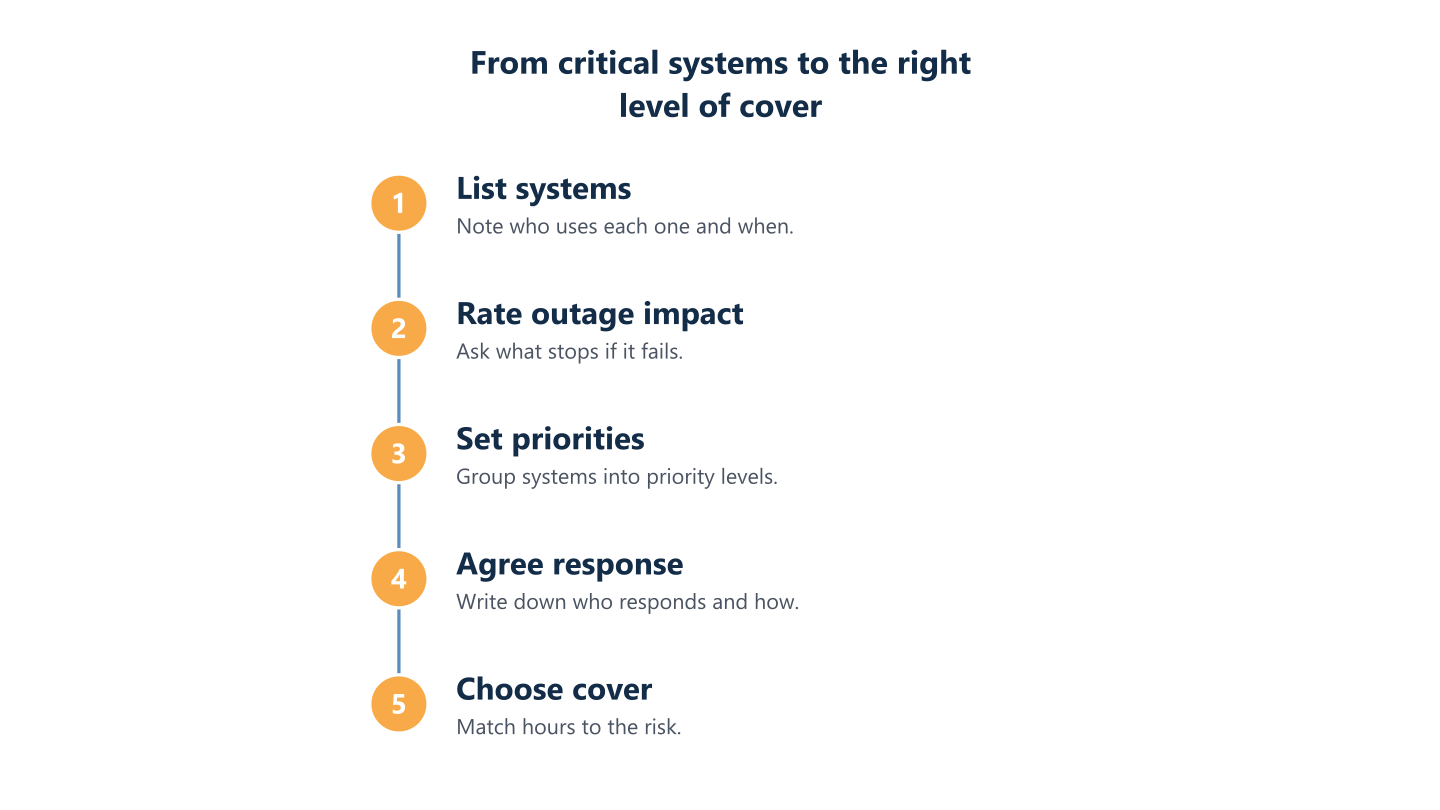
List systems and rank the impact of an outage
Begin with an inventory in plain language, not a technical diagram. For each system note who uses it, when, and what stops if it fails: email, file storage, accounting software, the website, telephony, remote access, printers and the network itself. Then add a rough impact rating, such as stops work for everyone, blocks one team or causes inconvenience. Include dependencies. A line-of-business application may rely on an internet link, an identity service and a database, and the weakest of those sets the real exposure. Ask the people who use each system, not only IT, because they know which tasks cannot slip and which deadlines are fixed. Date the list so you know when to revisit it.
Set priority levels
Group the ranked systems into a small number of priority levels; three or four is usually workable. For each level agree who is told, how quickly someone should acknowledge, and who owns the next step. Describe levels by effect rather than technology: business stopped, a team blocked, a single user affected, a routine request. Note the hours in which each level is handled, so nobody assumes more than has been agreed. Write down who inside your organisation may raise the top level, because without that rule every request becomes urgent. Agree the acknowledgement expectation with the provider in writing, rather than copying a figure from a website, since what is realistic depends on the scope you have chosen.
Response is not resolution
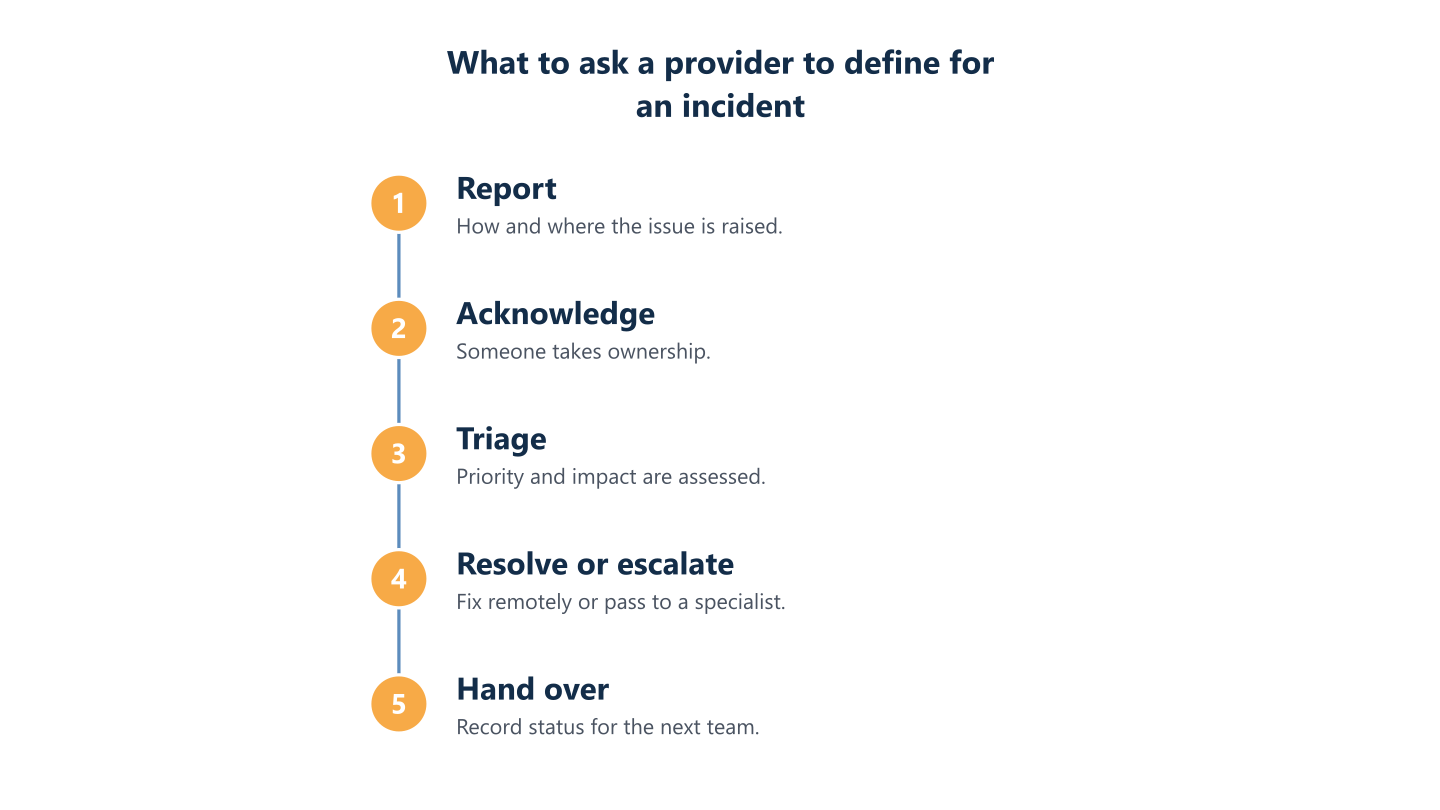
An acknowledged incident is not a resolved one. Acknowledgement tells you the issue has an owner; resolution time depends on the fault, access to the affected systems, third-party suppliers and how complex the cause is. A failed internet line may wait on a carrier, and a software defect may wait on a vendor fix. Treat any promise of a fixed resolution time with caution, and ask what the provider does while waiting: updates, workarounds, escalation and handover. Ask also how they report the three stages separately, because measuring only the first makes performance look better than your experience. The same logic applies to waiting on hold: set the expectation in writing for each priority and judge contact separately from the fix.
Write down who does what out of hours
Even if your provider works business hours, something will eventually fail on a Saturday. Decide in advance who inside your organisation is the first contact, what they may do and what they must leave alone. Write a short runbook: how to check whether the problem is local or wider, how to restart agreed services safely, which supplier numbers to call and who can authorise spending or access changes. Include a note on when to stop and wait for morning, because well-meant fixes at midnight can make a fault worse. Store it where it can be reached when systems are down, for example printed or on a device that does not depend on the office network. Test it once, with someone who did not write it.
Read the steps as text
List systems, rate outage impact, set priorities, agree response, choose cover
What should you ask a provider before choosing a level of cover?
Most disappointments with IT cover come from a gap between what was assumed and what was written. Before signing, put the same questions to every provider, including us: which hours, days, time zone and channels apply, who answers and in which languages, what is monitored and what is staffed, how a ticket is escalated, what happens on public holidays, how out-of-hours work is approved and how the next morning begins. Ask for the answers in the service description rather than on a call, and look for wording such as selected incidents or reasonable endeavours, which signals limits. Our practical guide to IT support across Europe adds more on comparing providers. You are welcome to ask us these questions; scope is agreed per organisation. Scope is agreed per organisation, on-site or installation work is subject to confirmation for each project, and our support runs Monday to Friday, 09:00 to 18:00 CET, in English and Spanish.
Hours, channels and who answers
Which hours, days and channels are covered, who answers, and how are public holidays treated? Ask for the time zone the hours refer to, because business hours is frequently undefined, and a phrase such as 24 business hours counts only working hours, so it can span several working days. Find out whether you reach a person by phone, portal, email or chat, and whether urgent and routine issues use the same route. Check the languages supported if your team works in more than one. Ask whether the person answering is the person who fixes the problem or a first contact who passes it on. Finally, see what the plan says about local public holidays, which vary by location and are often missed in contracts.
What is monitored and what is supported
What is actively monitored, what is supported by people, and what happens when an alert fires? Ask for a list of monitored items rather than accepting the word proactive. Servers, network devices, backups, cloud services and security alerts are different things, and some may not be watched at all. Then follow one alert through: who receives it, in which hours, what they are expected to do and how you are told. Ask also how automation is used. It can help with routine first-line requests and triage, but an incident still needs a person to own it, so find out where that handover happens. For security controls specifically, our guide on how to choose cybersecurity services lists further questions to ask.
Escalation, on-site work and suppliers
How are escalation, on-site attendance, supplier issues and out-of-hours work authorised, handed over and reported? Escalation should name roles and routes, not just say that it exists: who is the next level, what triggers it and how you are told. For on-site attendance, ask whether it is part of the arrangement at all and how it is confirmed. At BlueNova IT, on-site or installation work is subject to confirmation for each project, and any provider should be able to say the same plainly. For supplier issues, such as an internet carrier or software vendor, find out who contacts them and who holds the authority to act for you. Finally, ask how events are reported afterwards, so the next working day begins with a summary rather than a surprise.
How out-of-hours work is authorised
Out-of-hours work needs a decision before it needs an engineer. For any provider that offers it, ask who in your organisation can request it, who approves it and how that is recorded, because unplanned work at odd hours can create cost and risk if nobody agreed it. Check whether planned work, such as a weekend migration, is handled differently from a fault and whether it needs notice. Ask what the provider may change without asking you and what always needs your sign-off, for example disabling an account or restarting a production system. Make sure the process still works when your usual approver is unavailable by naming a deputy. A simple written rule here prevents both silence and surprise.
Read the steps as text
Report, acknowledge, triage, resolve or escalate, hand over
What options sit between business hours and round-the-clock cover?
Full cover is not the only alternative to waiting until morning. In rough order of effort, these options are worth weighing.
- Tighten planning by moving maintenance into staffed hours, testing restores and giving users a short out-of-hours note.
- Add redundancy for the few single points of failure that matter, such as connectivity or one key device.
- Run an internal on-call rota with written runbooks and external escalation contacts.
- Use a co-managed arrangement in which your own IT team and an external provider share defined responsibilities.
- Contract a separate provider only for the out-of-hours window you cannot avoid.
BlueNova IT offers co-managed IT, run jointly with an organisation’s own IT team, with support Monday to Friday, 09:00 to 18:00 CET, in English and Spanish. Co-managed with us does not extend to out-of-hours cover. Organisations that need round-the-clock monitoring or incident response should look for a provider that offers it.
Internal on-call with external escalation
Combine business-hours support with an internal on-call rota, written runbooks and clear escalation contacts. One or two trained staff members take turns as first contact, using runbooks that cover the handful of failures that matter, and escalate to external providers or suppliers when a problem goes beyond the runbook. The rota needs fair rotation, arrangements that respect your employment rules and clear limits on what on-call staff may change. Be honest about the people cost: it asks something of the individuals concerned, and it breaks down when the same person is always the one called. This approach suits organisations that already have technical staff, and it keeps decisions close to the business. Review the rota and runbooks regularly, especially after staff changes.
Co-managed IT alongside your own team
Use co-managed arrangements to share responsibility between your own IT team and an external provider, and agree the division in writing. A common split gives the internal team day-to-day knowledge of the business, and the provider extra capacity or specialist skills during its working hours. The risk is gaps and overlaps: two teams each assuming the other has patched, backed up or watched something. List who owns each task, how work is handed over and how changes are recorded. At BlueNova IT, co-managed IT is run jointly with the client’s own IT team, with support Monday to Friday, 09:00 to 18:00 CET, in English and Spanish, and scope is agreed per organisation. You can read more about our managed IT services.
Using a separate provider for the out-of-hours window
If an unavoidable out-of-hours need remains, choose a provider whose published hours match it, or use a separate provider for that window. Splitting is legitimate: one provider for the working day and another for nights or weekends, as long as the handover is clear. Define what the second provider may touch, how they get access and how they pass notes back to your daytime team so that fixes are not undone or repeated. Check that both agreements use the same priority definitions, or you will argue about what urgent means at the worst moment. Whichever route you take, read the published hours before the sales pitch, and prefer a provider whose hours simply match your need over one that stretches a description to fit.
Who business-hours support suits, and who it does not
Business-hours support from BlueNova IT suits organisations whose people and critical systems operate in the working day, that can wait until the next working day for most faults, and that want support in English and Spanish, Monday to Friday, 09:00 to 18:00 CET. It also suits those combining it with their own team or an internal rota. It does not suit organisations that need monitoring or incident response at night, at weekends or on public holidays, or that need an engineer on call. If that describes you, look for a provider whose published hours match, and use the questions in this guide to compare them. We would rather you chose the right cover than a convenient one.
The right level of cover follows from the consequences of an outage and the expectations you have written down, not from the label on a package. Start with your system list, rank the impact, set priorities, then compare providers on hours, scope and escalation in plain terms. To restate our position honestly, BlueNova IT supports organisations Monday to Friday, 09:00 to 18:00 CET, in English and Spanish. If your needs sit inside that window, or you want a co-managed arrangement alongside your own team, get in touch and we can talk through scope for your organisation. If they do not, you now have the questions to find a better match.