
An IT roadmap for a small business is a short, prioritised plan that shows which technology changes you will make, in what order and who owns each one, usually over the next 12 months. It links business goals to your current systems, risks and budget, and it is reviewed regularly rather than written once and filed away.
Most small organisations do not lack ideas for IT; they lack a shared order of work. Laptops age quietly, licences renew without a decision, and the person who 'looks after IT' is also running sales or finance. The result is a steady flow of urgent requests and very little planned improvement. A roadmap turns that flow into a short list you can discuss, fund and revisit. In this guide we explain how to create an IT roadmap, what to include, how to turn it into a 12-month plan and who should lead it, so that your IT strategy stays practical rather than theoretical.
Questions about this guide? Talk it through with us
What is an IT roadmap for a small business?
An IT roadmap is a time-ordered plan of technology changes, each tied to a business reason, an owner and a rough sequence. It is not the same as a business plan or an IT strategy, and it is not a project list. The table shows how they differ.
| Option | What it is | Best suited to | What to check |
|---|---|---|---|
| IT roadmap | Prioritised, time-ordered technology changes with owners | Deciding what to do first, and why | Does every item trace back to a business goal? |
| IT strategy | Principles and direction for how technology supports the organisation | Setting direction when the business is changing | Is it specific enough to guide a decision this quarter? |
| Business plan | Goals, markets and resources for the whole organisation | Agreeing where the business is heading | Does it mention technology needs at all? |
| Project list | Individual pieces of work, often added as requests arrive | Tracking delivery once decisions are made | Is anything ranked, or is it simply a queue? |
If your IT is mostly reactive, a roadmap gives you something to plan against. BlueNova IT offers IT consulting among its services, and the scope of any engagement is agreed with each organisation rather than assumed.
IT roadmap, IT strategy and business plan
A roadmap is a prioritised, time-ordered plan for technology changes that support stated business goals. The business plan sits above it and says where the organisation wants to be: new markets, more staff, a second site. An IT strategy for a small business translates that into direction, for example 'let people work safely from anywhere' or 'stop depending on one person’s knowledge'. The roadmap then answers the practical questions: what do we change first, who is responsible and what does it depend on? Keep the three documents consistent but separate. If the business plan changes, the roadmap should change with it; if the roadmap shows that a goal needs more IT capacity than you have, that is useful feedback for the plan. For IT planning for SMEs, a few pages are usually enough.
What a roadmap typically contains
A roadmap sits between the business plan, which sets direction, and individual projects, which deliver the work. In most cases a roadmap contains a short statement of goals, a summary of the current environment and a ranked list of initiatives. For each initiative it records an owner, a rough timing, its dependencies and the reason it matters. Many also include known risks, open questions and review dates. What it does not need is detailed technical design or task-level schedules; those belong in project plans. Technology roadmap examples often look like a simple table by quarter, or a board with three columns: now, next and later. Either format works, as long as people read it and can see what has changed since the last review.
Signs your IT is running reactively
Signs you need a roadmap include surprise renewals, ageing devices, unclear ownership and security fixes made only after an incident. Other signals are easy to recognise: nobody can say which accounts belong to former staff, a key system depends on one person’s memory, purchases are rushed because something failed, and the same problem returns every few months. Staff may also work around tools instead of reporting issues, because they do not know whom to ask. None of this means the organisation is doing badly; it is typical of a team that has grown faster than its IT arrangements. The point of a roadmap is to replace repeated emergencies with a visible order of work that everyone can follow.
Who should read and own it
A roadmap needs one named owner and a small group of readers. The owner is usually a director, an operations lead or whoever holds the technology budget. If you have an IT person, they can draft it, but a business leader should approve it. Readers should include finance, because spending depends on timing, and team leads, because changes affect their people. For distributed or multi-site teams with no full in-house IT, ownership matters even more, since nobody else will notice drift. An outside adviser, or a co-managed arrangement in which an external provider works jointly with your own team, can contribute expertise, but accountability for priorities stays with the organisation. We return to this choice later in the guide.
How to build an IT roadmap step by step
You do not need specialist software to build a plan; a shared document or spreadsheet is enough. A workable sequence looks like this, though the detail depends on your organisation.
- Write down the business goals for the next 12 months and anything likely to change them.
- Inventory devices, software, accounts, suppliers, contracts and renewal dates.
- List known pain points by asking staff what slows them down or worries them.
- Assess risks and gaps, noting the assumptions behind each judgement.
- Rank candidate initiatives by risk, business impact and effort.
- Assign an owner and a rough quarter to each priority.
- Share the draft, collect feedback and set the first review date.
An outside adviser can help most with the inventory and prioritisation steps, where fresh eyes save time. BlueNova IT agrees the scope of any consulting work with each organisation, so we do not assume a fixed process, deliverable or duration. If you are short of time, start with steps one, two, four and five, and refine the rest at your first review.
Define the business goals first
Begin with what the organisation wants to achieve, such as growth, new sites, remote working or better resilience. Phrase each goal in business terms first, then ask what would have to be true technically for it to work. 'Open a second office' implies a network, accounts and devices ready for new people; 'make remote working dependable' points to identity, laptops and collaboration tools. Include constraints too: seasonal peaks, contracts ending or a planned recruitment drive. Keep to a handful of goals, because if everything is a goal, nothing is prioritised. Ask each director what would make the year a success and what would hurt most if IT got in the way. Those answers shape the ranking later and keep the roadmap anchored to the business rather than to the latest product.
Inventory what you have today
Take an honest inventory of devices, software, accounts, suppliers, renewals and known pain points before choosing solutions. A spreadsheet is enough. For devices, record who uses each one, roughly how old it is and whether the manufacturer still supports it. For software and subscriptions, record the owner, how many licences are in use, the renewal date and whether anyone has reviewed the need. Include administrator accounts, shared mailboxes, domain names and which supplier looks after each system, as these are often forgotten until something breaks. Finally, add what people complain about: slow sign-ins, unreliable Wi-Fi at one site, files saved in five places. Do not aim for completeness on the first pass; a rough, accurate picture beats a perfect one that is never finished.
Assess risks and gaps
Rank initiatives by risk, business impact and effort, and write down the assumptions behind each ranking. Risk asks what could go wrong if you do nothing: a single administrator account, backups nobody has tested, an unsupported laptop holding client data. Impact asks how much the business would feel it. Effort covers time, cost and disruption, including how much of your own team’s attention the work takes. A simple high, medium or low score for each is enough; precision here is false comfort. Writing assumptions down matters because they are often what changes: 'we assume the second site opens in spring' can move a project by a quarter. Treat regulation, such as data protection rules, as one input to risk, and take proper advice where legal obligations apply.
Prioritise and assign owners
Turn the ranked list into a short set of priorities, ideally a handful per quarter, and give each one a named owner. The owner does not have to do the technical work; they make sure the item is decided, funded and finished, and they report on progress. Where one item depends on another, such as new laptops waiting for an identity change, record the dependency so the order makes sense. A simple IT roadmap template needs only a few columns: initiative, reason, owner, target quarter, dependencies and status. Anything that does not fit the current quarter goes into a 'later' list rather than a heap of half-started work. Agree who reviews the table and when, so that ownership is real rather than nominal.
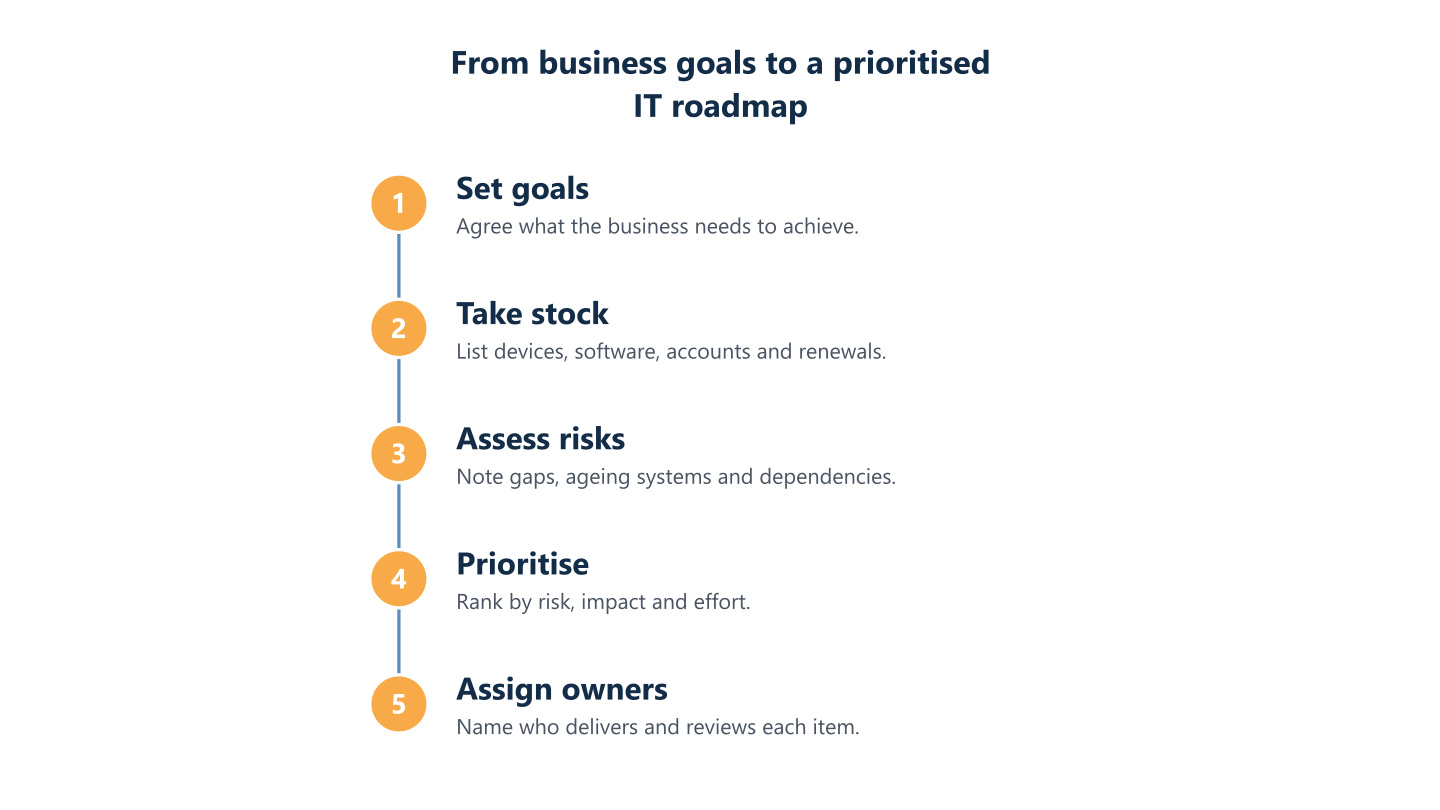
Read the steps as text
Set goals, take stock, assess risks, prioritise, assign owners
What should a small business IT roadmap include?
Use the list below as prompts for discussion rather than a mandatory checklist. Not every business needs every line, and the right depth depends on your size and risks.
- Devices, software and renewals: age, support status, licences and who decides on each renewal.
- Cloud and Microsoft 365: how email, files and sign-in are set up, and who administers them. BlueNova IT offers cloud and Microsoft 365 services, with scope agreed per organisation.
- Security, access and backup: who can sign in, how accounts are protected, what is backed up and how restores are tested.
- Networks and sites: internet connections, Wi-Fi and equipment at each location. For a new office, see our new office IT checklist.
- People and process: joiners and leavers, training, documentation and how users ask for help.
- Automation and AI: workflows worth automating and AI tools worth trialling with care.
BlueNova IT can discuss these areas with you, including cybersecurity, networks and infrastructure, and Automation and AI (covering AI and workflow automation), with the scope agreed for each organisation. A roadmap is a planning aid, not a standard package and not a guarantee of any regulatory outcome.
Devices, software and renewals
Devices and software lifecycle comes down to age, support status, licences and renewal dates. Aim for a rolling replacement pattern rather than emergency purchases: when laptops are replaced in turn, spending is smoother and nobody works on a failing machine before a deadline. Note when each operating system or application stops receiving security updates, because that date is a firm constraint you can plan around. For software, list what each subscription is for, who uses it and when it renews, and flag overlap, such as two tools doing the same job. Include phones, printers and any specialist equipment. Give renewal dates their own column, because they are natural decision points: a roadmap gives you time to review a contract before it renews automatically.
Cloud and Microsoft 365
Cloud, Microsoft 365, identity and access, security basics and backup all need a named responsible person. For many small businesses, Microsoft 365 holds email, files, calls and the sign-in used by other systems, so it earns its own lines on the roadmap: how licences are assigned, how accounts are protected, how shared files are organised and who administers the tenant. Be clear about what the provider looks after and what remains yours; responsibility for configuration, user accounts and data retention typically sits with the customer. Add any other cloud services you use and ask whether each is still needed, who pays for it and what happens to your data if you leave. These answers feed directly into priorities and renewals.
Security, access and backup
Security and backup belong on the roadmap as ongoing lines, not one-off projects. Access comes first: who can sign in to what, whether multi-factor authentication is switched on for email and administrator accounts, and how quickly a leaver’s access is removed. Next, consider how laptops and phones are protected and how updates reach them. Then backup: what is copied, where, how often, who checks it and when a restore was last tested. A backup that has never been restored is an assumption, not a safeguard. Our guide to backup and recovery, RPO, RTO and the 3-2-1 rule explains the terms worth agreeing. Record who is responsible for each item and revisit them after any incident or change of supplier.
Networks, sites and people
Networks matter most when the business changes shape: a new office, a move, more people working from home. List each site with its internet connection, Wi-Fi and network equipment, note who looks after it and mark anything undocumented. For multi-site or distributed teams, ask how people connect securely and what happens when one location has a problem. Then plan for people and process: how joiners and leavers are handled, what training staff receive, where documentation lives and how users ask for help. A roadmap that covers technology but ignores these points tends to stall, because the change never reaches daily habits. Name someone to keep the documentation current, even if it is brief.
Turning the roadmap into a 12-month plan
A 12-month IT roadmap works best when it is split into phases, with the next quarter described in detail and later quarters kept deliberately broad. Take the ranked list from the previous section and group items by dependency and urgency rather than by technology. The outline below is an illustration only; your own order should follow your goals, risks and capacity.
Illustrative example: foundations in the first quarter, improvements in the second and third, and one larger change in the fourth, with a review at the end of each quarter.
Set the review points before you start, and agree who can add or remove items between them. BlueNova IT can discuss phasing and priorities with your organisation; support is available in English and Spanish, Monday to Friday, 09:00 to 18:00 CET, and any on-site or installation work is subject to confirmation for each project. Whatever the sequence, treat the plan as a working document: expect to move items as the business changes, and record why you moved them.
Phasing: foundations, improvements, change
Put foundations first, such as ownership, access, backup and renewals, then improvements, then larger changes. Foundations reduce everyday risk and make later work easier: a named owner, tidy accounts and administrator access, tested backups and a calendar of renewals. Improvements follow, such as consolidating overlapping tools, standardising devices or fixing the Wi-Fi at the site that complains most. Larger changes, for example moving a major system, opening a site or automating a workflow, belong later because they depend on the earlier layers and need more planning. Many technology roadmap examples begin with a migration; we would rather you first know what you have and who is responsible. For access and protection basics, our guide on how to choose cybersecurity services sets out the types of control and the questions to ask.
Budget conversations without guesswork
Plan fewer initiatives than you think you can deliver, and leave room for unplanned work. Budget conversations go better when each initiative has a reason, an owner and a rough timing, because finance can then see what is discretionary and what is driven by a renewal date or an unsupported system. Separate recurring costs, such as subscriptions and support, from one-off costs, such as devices or project work, and note how each behaves as headcount grows: if pricing is per user, the cost rises with staff. Ask suppliers what is included and what is charged separately, and have the scope written down. Avoid false precision; stated assumptions are more honest than a single figure you cannot defend. Compare actual spend with the roadmap at every review.
Review points and trigger events
Set review points and name the events that should trigger an update, such as a new site, a leaver in a key role or a supplier change. A quarterly check is a sensible default for many small organisations. In a short meeting, review what was done, what slipped and why, and whether the order still makes sense. Once a year, revisit the goals themselves. Other trigger events include an acquisition, a security incident, a major contract ending, a rule change that affects your sector or a significant change in headcount. When one occurs, update the roadmap straight away instead of waiting for the next scheduled review. Keep a brief change log so that anyone can see what moved, who agreed and the reason.
Keeping the roadmap short and usable
Aim for a roadmap that someone can read in a few minutes: one page of goals and priorities, a table by quarter and a short list of risks. Put detail in supporting documents, such as the inventory, and link to them. Use plain language so that directors and team leads can challenge the plan, and describe what you need rather than naming products where a description does the job. Limit work in progress; if more than a few initiatives are open at once, something will stall. Mark each item as planned, in progress, done or deferred, and keep deferred items visible with a reason. A short roadmap that is kept up to date is more useful than a thorough one that is not.
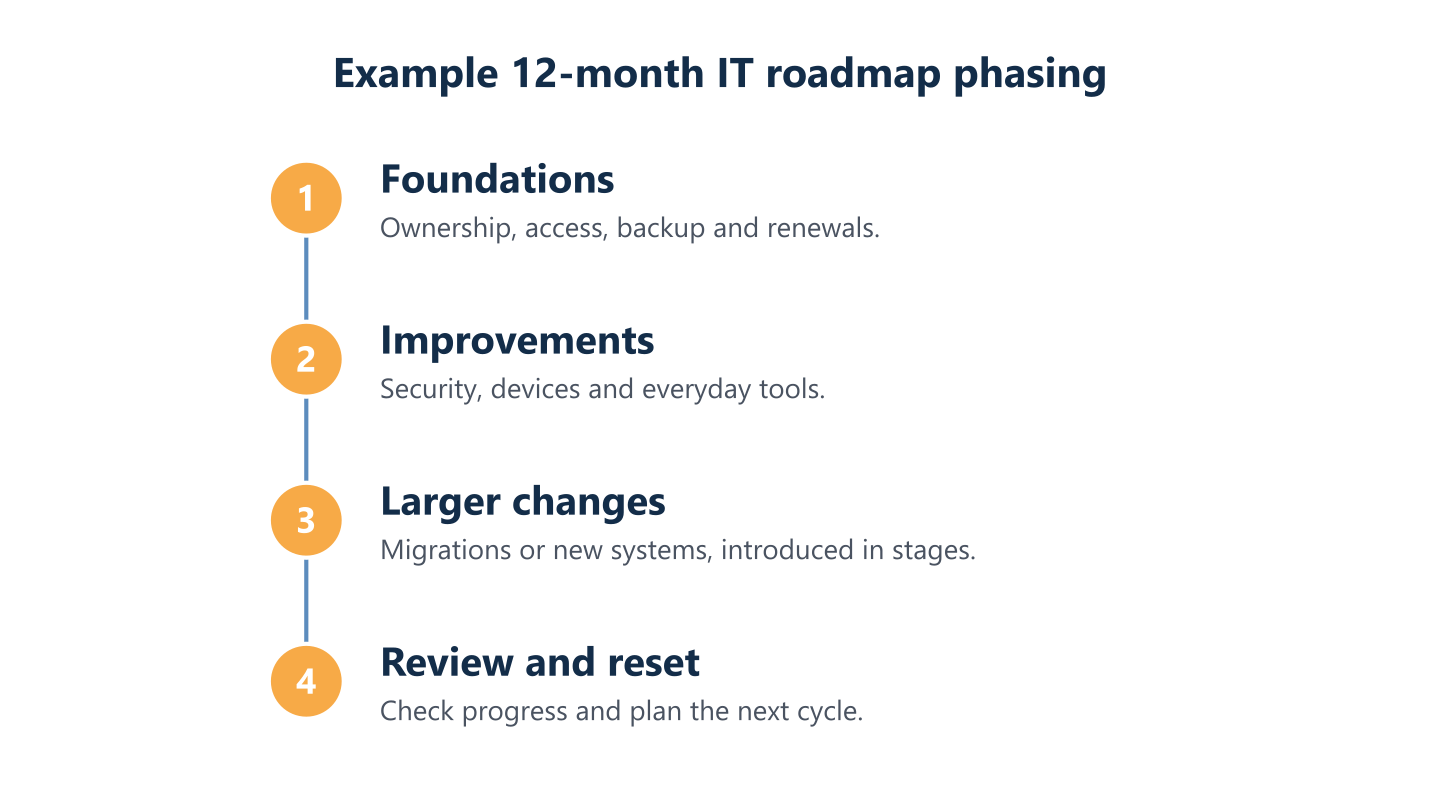
Read the steps as text
Foundations, improvements, larger changes, review and reset
Fractional CIO, in-house IT lead or managed IT provider?
Three arrangements cover most small organisations that need someone to own an IT roadmap: a part-time senior adviser, a person employed in-house or an external provider. Each solves a different problem, and none is right for everyone. A fractional CIO, an option some companies use, brings senior planning and supplier judgement for a fixed share of time. An in-house IT lead brings continuity, day-to-day presence and knowledge of how your people work. A managed IT provider brings a team, tooling and support processes, and a co-managed arrangement shares the work with your own staff. The choice depends on how much planning compared with operations you need, how many sites and people you have, and what you can keep running when someone is away. BlueNova IT’s relevant services are IT consulting, managed IT services and co-managed IT. Co-managed IT is run jointly with a client’s own IT team, and responsibilities are agreed for each organisation. The sections below describe the options neutrally so that you can compare them whichever route you take.
What a fractional CIO does
A fractional CIO is typically a part-time senior adviser focused on strategy, planning and supplier decisions rather than daily support. In practice that may mean helping leadership set technology goals, building and maintaining the roadmap, reviewing contracts and advising on risk and budget. The arrangement is often contractual and time-limited, and the adviser usually works alongside whoever handles daily support. It tends to suit organisations that need senior judgement but cannot justify a full-time executive, or that are changing quickly. What to check: how much time is committed, who covers when the adviser is unavailable, how decisions and documents are handed over, whether the adviser has commercial ties to the suppliers they recommend and what happens when the engagement ends. Terms vary widely, so definitions matter more than titles.
When an in-house IT lead fits
An in-house IT lead gives continuity and local knowledge, but depends on one person’s time, skills and availability. They know the people, the premises and the history, and can respond in person, which many teams value. The risks are concentration and capacity: holidays, illness or a resignation can leave gaps, and one person rarely covers strategy, security, support and procurement equally well. When comparing a fractional CIO vs IT manager, the question is often scope: an IT manager typically runs operations and people-facing support, while a fractional CIO focuses on direction. Combined arrangements are common, for example an in-house lead supported by an outside adviser or provider. Check that documentation is shared, that administrator access is not held by one person alone and that someone is authorised to decide when the lead is away.
Managed IT, co-managed IT and consultants
A managed or co-managed IT provider can combine planning with day-to-day support, but responsibilities must be clearly agreed. With managed IT services, the provider typically runs defined parts of your environment; with co-managed IT, the work is shared with your own IT team, so the split of tasks matters. Consultants usually work on a defined piece of advice or a project and then hand over. BlueNova IT offers managed IT services and co-managed IT, with responsibilities agreed for each organisation. Whichever model you consider, ask who approves changes, who holds administrator access, who owns documentation and who talks to suppliers, and write the boundaries down. Check also how knowledge returns to you at the end of the relationship, so that facts about your own systems never depend on a supplier.
Questions to ask before choosing
Whichever route you consider, ask the same questions and compare the answers in writing.
- What exactly will you be responsible for, and what stays with us?
- Who will we deal with day to day, and who covers absence?
- How are decisions, changes and documents recorded and handed back to us?
- Who holds administrator access to our systems and accounts?
- How will you work with our existing team and suppliers?
- What happens at the end of the arrangement, and how do we exit?
- What is included, and what is charged separately?
Clear, plain answers matter more than impressive titles. If an adviser cannot explain scope, responsibilities and handover simply, ask again before committing.
Common IT roadmap mistakes to avoid
Most roadmaps fail quietly: they are written, approved and then ignored. These are the patterns to watch for, each with its remedy.
- Leaving the roadmap without an owner or review date; name a person and book the first review before you finish.
- Starting from products rather than goals; write the business reason beside every item.
- Planning every detail for twelve months; keep the next quarter specific and later quarters broad.
- Ignoring training and adoption; include time for people to learn and to give feedback.
- Overloading the plan; commit to fewer initiatives than you could deliver and leave room for urgent work.
- Treating it as a one-off document; update it at reviews and whenever a trigger event occurs.
BlueNova IT works with small and midsize organisations, often with distributed or multi-site teams and no full in-house IT, and agrees scope with each one. If your team works in more than one language, our guide to multilingual IT support covers what to ask for.
No owner, no review
A roadmap with no named owner or review date quickly becomes a document nobody opens. The owner is the person who answers when someone asks what happened to item four, and who calls the review. Without one, urgent requests push planned work aside, and after a few months the document describes a business that no longer exists. The fix is simple: write the name and the review date on the front page, put the review in the calendars of the people who must attend and agree what happens if the owner leaves. Where there is no in-house IT, the owner is often a director, supported by an adviser or provider; accountability still sits with the business. Keep brief notes of each review so decisions are not lost.
Planning around products instead of goals
Items such as 'buy a new firewall' or 'move to a particular tool' sound concrete but hide the question of why. Write each item as an outcome, for example 'new starters can work securely on their first day', then choose the product that serves it. Too much detail, too early, also makes the plan brittle: features, suppliers and staffing change within months, so keep the next quarter specific and later quarters broader. Product-led plans tend to follow vendor marketing rather than your own risks, and they make it harder to say no to attractive tools you do not need. Keep a short note of the alternatives you considered, so that the reasoning survives when the person who made the decision has moved on.
Ignoring people and adoption
Plans that ignore people, training and change management often stall even when the technology is right. A new tool that nobody has been shown how to use becomes another unused subscription, and a security measure that slows people down will be worked around. Include time for communication, short training sessions and a way to gather feedback, and ask team leads early who will be affected and how. Identify one or two people in each team who can help colleagues, and record what changed in a few lines so that support requests have somewhere to start. Allow a settling period before judging whether something worked.
Treating the roadmap as a one-off project
A roadmap is a living document, not a deliverable that is finished once. Businesses change, suppliers change and risks change, so a plan that is never revisited drifts out of date. Treat it as a routine: a short review each quarter, an annual look at the goals and an update whenever a trigger event happens. Keep a version history so people can see what moved and why. If an adviser helps you start, make sure you can maintain the roadmap yourselves, with documents in formats your team can edit and a clear handover. The aim is a habit rather than a project.
A useful roadmap is short, owned and reviewed. Who leads it matters less than agreeing clear responsibilities, so that everyone knows who decides, who does the work and who checks it. Start with your goals and an honest inventory, then decide what help, if any, you need, whether that is a part-time adviser, an in-house lead or an external provider. If you would like to talk through priorities, owners and sequencing, BlueNova IT can discuss your situation, with scope agreed for your organisation and support in English and Spanish, Monday to Friday, 09:00 to 18:00 CET.