
A disaster recovery plan for a small business can fit on one page: names, systems, order and contacts. Keep a copy outside your own systems and rehearse it.
Most small firms do not need a binder. They need a sheet that someone can pick up on a bad morning, when email is down and the person who knows the passwords is on a plane. This guide shows what goes on that sheet, who owns each line and how to keep it honest.
Questions about this guide? Talk it through with us
What a one-page disaster recovery plan for a small business contains
An IT disaster recovery plan is a runbook for the first hours of an incident, not a policy document. The page carries names, systems, order and contacts. For backups, RTO, RPO and the 3-2-1 rule, read our backup and recovery guide instead of repeating them here.
These sections typically belong on a sheet that works:
| Section of the page | What to write | Who owns it | How often to review |
|---|---|---|---|
| Critical systems | Systems that stop revenue or service, with owners | Technical lead | When systems change |
| Roles and deputies | Three named people and a cover for each | Recovery lead | When staff change |
| Recovery order | Dependencies first, then tiers | Technical lead | After every test |
| Contacts and messages | Offline contact tree and who says what | Communications lead | Every few months |
| Test record | Date, result and fixes still open | Recovery lead | After every test |
The five blocks of the page
The page answers five questions. What matters most: a short list of critical systems, each with an owner. Who decides: three named roles and their deputies. In what order things return: a recovery sequence that respects dependencies. Who communicates: a contact tree and the messages staff and customers should hear. When it was last tested: a date, the result and any fix still open. Keep each block to a few lines. If a block needs a paragraph of explanation, move the explanation to a linked document and leave a pointer on the page. A sheet that fits on one side of A4 gets read; one that runs to six pages gets filed.
Scenarios worth planning for first
Plan first for the ordinary failures, because they are the ones small teams typically meet: a dead drive, an accidental deletion, a lost or stolen laptop, a compromised account, a supplier outage and a locked-out premises. One page can handle all of them, because the questions are the same each time: what is affected, who decides, what comes back first and who tells whom. Write one line per scenario noting which system or person it hits hardest. Larger events, such as a fire or a long power cut, use the same sheet; they simply affect more systems at once.
One page versus a full business continuity plan
A business continuity plan covers the whole organisation: premises, people, suppliers, customers and how the business keeps trading. The IT side of it, a business continuity plan for IT, is the disaster recovery plan, and the one-page version is the sheet you reach for first. Detail belongs in linked documents such as supplier contracts, network diagrams and restore procedures; the page itself carries names, systems, order and contacts. If you already have a continuity plan, keep the IT sheet separate, so it can be printed, stored offline and handed to a deputy without the rest.
Roles, decision rights and a contact tree
Three named roles, a clear rule on who declares an incident and an offline contact tree cover most small teams. Work through it in this order:
- Name a recovery lead who can declare an incident and decide what is recovered first.
- Name a technical lead who runs the restores, whether an employee, an outside provider or both.
- Name a communications lead who speaks to staff, customers and suppliers.
- Add a deputy for each role, and state that any task nobody owns falls to the recovery lead.
- Decide who approves emergency spending, and write down the limit.
- Build a contact tree that works when your systems do not.
BlueNova IT works regularly with co-managed IT, where we run IT jointly with a client’s own team, so an outside provider can be listed in the tree, with its published support hours. Write those hours next to its name, ours included.
Three roles that cover a small team
In a small team three roles are usually enough. The recovery lead declares the incident, decides what happens first and signs off when normal service resumes. The technical lead runs the restores and keeps a log of what was done and when. The communications lead talks to staff, customers and suppliers, and is the only person who does. In a very small business one person may hold two roles, but write down which two, and avoid giving the technical lead the communications role as well, because restoring and explaining at the same time tends to go badly.
Deputies and who approves spending
Name a deputy for each role. People are on holiday, ill or unreachable on the day, and the page should still work. Add one line stating that any task nobody owns falls to the recovery lead, so nothing waits for a volunteer. Then settle who approves emergency spending: a replacement laptop, an urgent supplier call-out or a temporary service. Write the person’s name and the limit they can approve without asking anyone else. If the recovery lead is also the owner of the business, say so and name who approves when the owner cannot be reached.
A contact tree that works when email is down
Email may be the first thing to fail, so the incident contact list cannot depend on it. Use mobile numbers and personal email addresses, and put each person’s role next to their name. Say who calls whom, so nobody has to phone everyone. Decide in advance who may speak to customers, insurers and the press; everyone else refers questions to the communications lead. Keep the tree outside the systems that may be down: a printed copy, a note on personal phones or a file in a service your business does not rely on. At least two people should hold a current copy.
Suppliers, insurer and outside IT support
Add the contacts you would otherwise hunt for under pressure: your internet provider, the main software and hosting suppliers, the insurer with the policy reference, and any outside IT support you rely on. Beside each, write what you would ask them for and the support hours they publish, rather than what you assume. Check what the insurance policy requires you to report, and who reports it. An outside provider can be named as the technical lead’s backup or as the first call for specific systems; write down what is actually agreed, not what you hope for.
Critical systems and the order of recovery
The order of recovery is a short list of what comes back first, and why. Build it in four moves:
- List the systems that stop revenue or customer service if they fail, and nothing else.
- Give each system a business owner and a technical owner.
- Group the list into a few tiers: needed first, needed next, can wait.
- Check each system’s dependencies and move those earlier in the order.
Our networks and infrastructure and cloud and Microsoft 365 services can help you review your systems, within a scope agreed per organisation. For setting recovery targets per system, use the backup guide linked above; the page itself should carry no timings or promises.
The short list of critical systems and their owners
List only what stops revenue or customer service. For most small businesses that means sign-in, email, the finance or order system, shared files and the internet connection; yours may add a booking tool, a phone system or a point-of-sale device. Next to each system write its owner and where its data lives, whether on a server, in a cloud service or on a laptop. If a system is not on the list, the page does not cover it, and that is deliberate: a long list hides the few things that matter. Revisit the list whenever you add or retire a system.
Tiers instead of one long list
Give every system a business owner and a technical owner. The business owner decides how much downtime hurts, and therefore which tier the system sits in; the technical owner knows how it is restored. Use three tiers without timings: needed first, needed next, can wait. Timings invite promises nobody can keep, while a ranking starts a useful conversation about what the business actually needs. Settle disagreements in advance, with the recovery lead as tie-breaker, so nobody argues about priorities in the middle of an incident.
Dependencies: sign-in, network and internet first
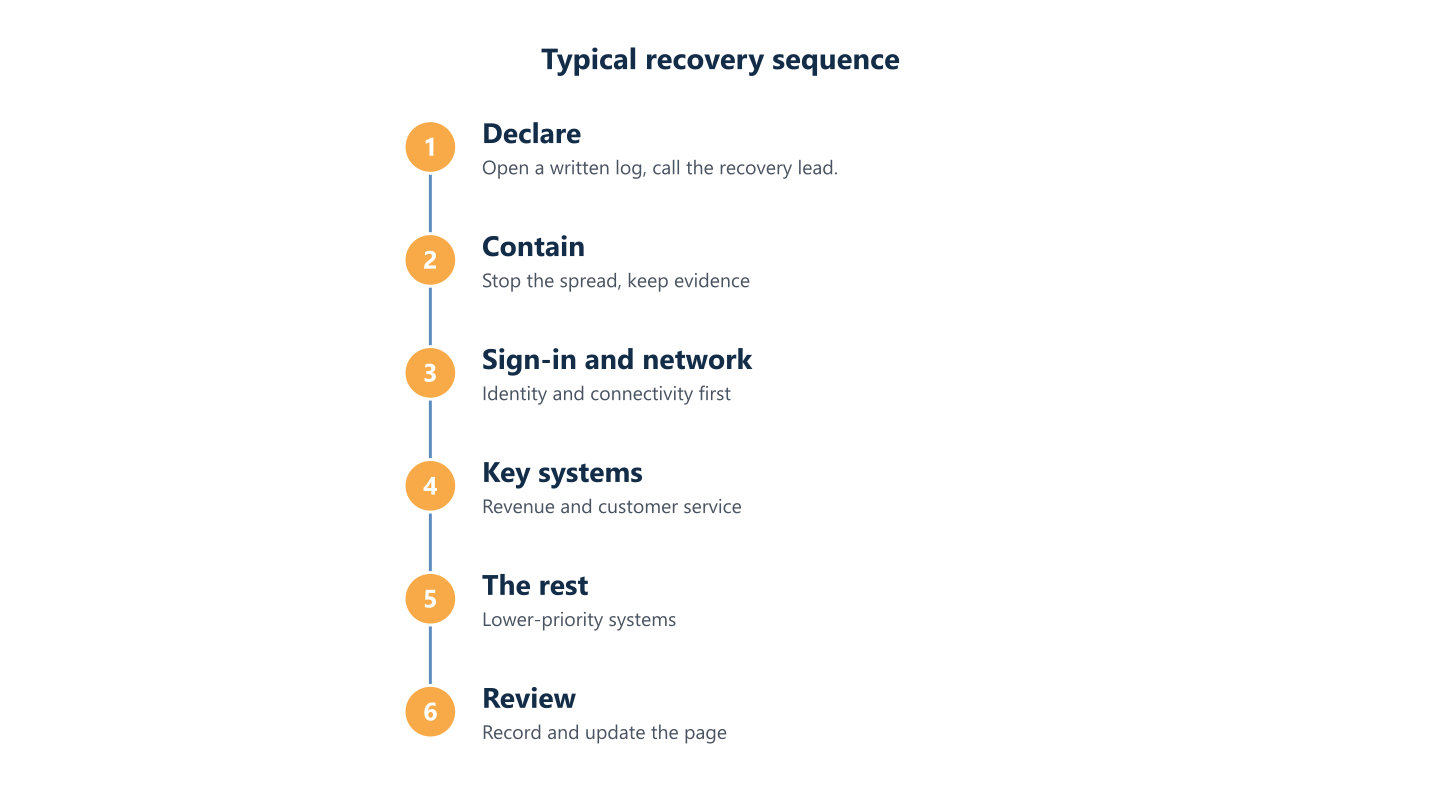
Sort into tiers, then recover in dependency order. Identity and network come before the applications that rely on them: if staff cannot sign in, or the office cannot reach the internet, a perfectly restored finance system is of no use. A typical chain runs from internet connection and network, through sign-in, to shared files and email, and then to line-of-business applications. Write the chain as a short numbered sequence at the foot of the page. For a business on Microsoft 365, add the administrator accounts and who holds them, because losing access to those slows everything behind them.
The first hour: contain, decide and communicate
The first hour of an incident shapes how tidy the rest of it is. Declare the incident, open a log, contain before restoring, assess what is affected and tell the right people the right things. The recovery lead makes the call, and nobody starts restoring until they do.
Contain before you restore: a machine wiped in a hurry takes its evidence with it.
Write these opening steps as five short lines on the page, in order, so that a deputy can follow them cold. Our cybersecurity and managed IT services can help with account security. That is preparation done before anything goes wrong; it is not an incident-response or monitoring service, so the page should never assume anyone outside your own team is available beyond their published support hours.
Declare, log and contain
Declare the incident, open a written log with times and decisions, and call the recovery lead before anyone starts restoring. The log can be a notebook; what matters is that every action has a time and a name beside it. Then contain: stop the spread, preserve what you may need to investigate and avoid wiping affected machines in a hurry. If an account looks compromised, reset its credentials and end its active sessions; our Microsoft 365 security baseline checklist covers the settings that make this easier to do calmly.
Who hears what, and in what order
Staff hear first, because they are the ones who will be asked questions and who need to know what to stop doing. Customers and suppliers who are actually affected come next, then the insurer, and anyone else only if there is a reason. Each message should say what happened in plain words, what is being done and when the next update will come, without guessing at causes. Write holding statements on the page in advance, so the communications lead edits a few lines instead of drafting under pressure, and agree one spokesperson to keep the story consistent.
Channels that work when your systems are down
If email and chat are the affected systems, you cannot use them to announce the problem. List the channels you will use instead: phone calls from the contact tree, a messaging app on personal phones, a text message to staff and a recorded greeting on the main phone line. Say who sends what, and keep the wording short and approved in advance. Test the channels as well as the plan: check that numbers are current, that people know where the printed copy sits and that someone outside the office can send the first message if the premises are unavailable.
Read the steps as text
Declare, contain, sign-in and network, key systems, the rest, review
Testing the plan and keeping it current
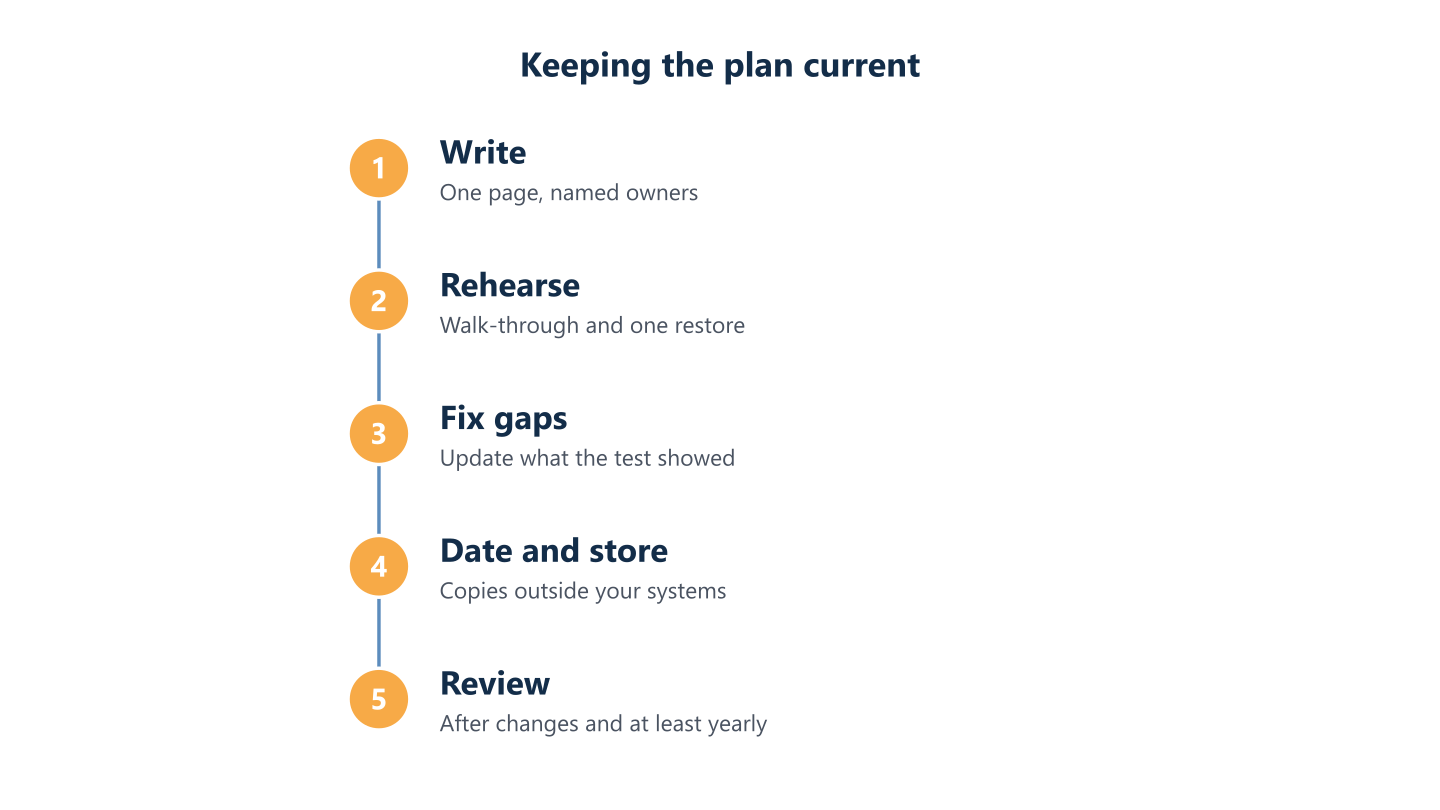
A disaster recovery plan that has never been rehearsed is a set of assumptions, and the first rehearsal usually finds the gaps. Run two kinds of test: a short walk-through with the people named on the page, and a real restore of one system. Review the page whenever systems, suppliers or people change, date every version and keep copies outside the systems that may be down. After a real incident, record what happened and update the page while it is fresh. Managed IT services can help you plan these tests, and the first step is to contact us to discuss your requirements. Outcomes depend on your systems, your data and the incident.
A walk-through with the people on the page
Walk through one realistic scenario with the named people, around a table, in a single short session. Pick something ordinary, such as the shared files being unavailable on a Monday morning while the recovery lead is on leave. Ask each person what they would do first, and read the page aloud as you go. Note every question the page cannot answer: a missing number, an unclear owner, a system nobody listed. Fix those gaps before the session ends or assign each to a named person. The aim is not a polished exercise but a page that answers every question that comes up.
Testing a real restore
Restore one real system into a separate environment and compare the result with what the plan assumes. Choose a system from the first tier, ideally one whose owner can confirm that the data is complete and usable, not merely present. Record how long it took, to feed the recovery targets in the backup guide, along with what was missing and which step relied on knowledge in one person’s head. Repeat with a different system next time, so that over a few tests the whole list has been exercised.
When to review, and where the copies live
Review the page after any change to systems, suppliers or people, and at least once a year; date every version so nobody works from an old one. Keep a printed copy at the main premises and with each role holder and deputy, plus a current file in a place that does not depend on your own network. Remove outdated copies when you issue a new one. Put the review date into your wider planning too: our IT roadmap for small business guide shows how to plan a year of IT work, and the page belongs on that list.
After an incident: record and update
Use the log you kept to write a short review while memories are fresh: what happened, what worked, what did not and what will change. Keep it factual and avoid assigning blame, because people who fear blame stop logging what they did. Turn each finding into an edit on the page or a task with an owner, then update the date and reissue the copies. If the incident revealed a system nobody had listed, add it to the tiers. Share the revised page with everyone named on it, so the next person to pick it up starts from what you learned. Keep it with your other records: see IT documentation: what to keep and where.
Read the steps as text
Write, rehearse, fix gaps, date and store, review
A plan is only as good as its last rehearsal. Pick one system, one scenario and one afternoon this month, and fix what the test shows. Keep the page short, keep a copy outside your own systems and let each rehearsal tell you what to change next. For the data side, go back to the backup guide earlier in this article. If you would like to talk through your own setup, we support organisations in English and Spanish, Monday to Friday, 09:00-18:00 CET, and scope is agreed per organisation.