
An AI use policy for a small business is a short document that says which AI tools staff may use, what data may go into them, who checks the output and when the rules are reviewed. Start with an approved tools list and simple data classes, then check access permissions before enabling Copilot. This is general information, not legal advice.
In a small team, someone may already be using an AI assistant to draft or summarise, whether or not anyone decided how. A policy of a page or two turns that into a shared habit: people know what is allowed, managers know what to check, and nobody has to guess.
Questions about this guide? Talk it through with us
What an AI use policy is and why a small business needs one
A policy is the written answer to three questions staff will otherwise settle for themselves: which tools may I use, what may I put into them, and who checks what comes out? Short, specific rules work better than silence or a blanket ban, because people follow what they can remember. The table is a practical starting point, not a legal classification.
| Data class | Typical examples | May it go into AI tools? | What to check |
|---|---|---|---|
| Public | Published web copy, brochures | Usually, on an approved tool | The tool is on the approved list |
| Internal | Meeting notes, internal procedures | On approved tools only | The tool’s current data terms |
| Confidential | Client files, contracts, financial detail | Only with approval for that tool and task | Current vendor documentation and contract terms |
| Regulated or personal | Personal data, HR and health records | Not unless the policy and your adviser allow it | Current rules and your national authority |
What the policy covers and what it does not
A policy sets boundaries for everyday use: which tools, which data, which tasks, who checks the result and who to ask when in doubt. It typically covers chat assistants, AI features inside software you already use, browser add-ons and meeting transcription. It names an owner, so questions have somewhere to go, and says what to do when something goes wrong.
It does not replace your data protection documents, your client contracts or your security policy; it points to them. For the EU AI Act, GDPR or sector rules, check the current rules and your national authority, and take advice where the stakes are high.
Why a blanket ban tends to backfire
Without rules, staff decide for themselves, often on personal or free accounts that the business cannot see or control. A blanket ban sounds safe, but it typically pushes use out of sight: the same drafting and summarising still happens, only on a phone or a personal login, and nobody can tell which data went where.
A clear approved list gives people a legitimate route and gives you something to review. That does not mean everything is allowed. Some tasks can still be restricted, and some data stays out of AI tools entirely. Rules people can follow tend to beat rules people quietly work around.
Policy versus automation project
A policy is about how people use AI day to day; planning automated workflows is a separate piece of work. Deciding who may paste a paragraph into an assistant is not the same as deciding which process should run without a person in the loop, who owns it and how it is monitored.
If you are weighing automation, our guide on how to start with AI automation covers choosing workflows and managing risk. This guide stays on staff use and readiness. The two meet at data: both depend on knowing what may go where, so a short policy is a sensible first step.
Approved tools, data classes and what staff may do
When people ask what to include in an AI policy, this is the core. Seven steps, each usually one or two sentences long, give you an AI acceptable use policy for staff that fits on a page or two:
- State the purpose and who it applies to, including contractors and temporary staff.
- List the approved AI tools, each with a named owner and the data classes it may be used with.
- Define four data classes in plain words and say which may go into which tool.
- Require work accounts, not personal ones, for any work-related AI use.
- Name acceptable tasks, restricted tasks and the rule for decisions about people.
- Say that a named person checks every output before it is sent, published or acted on.
- Say who to ask, how to report a mistake and when the policy is next reviewed.
BlueNova IT is not a law firm, so treat the data classes as a practical starting point rather than a legal classification.
An approved tools list and how to request a new tool
Keep an approved AI tools list with a named owner, and say that a tool not on the list needs approval first. Each entry can note the account type staff must use, the data classes allowed and the date it was last reviewed.
For requests, a simple route works: the person describes the task and the data involved, the owner checks the vendor’s current documentation and data terms, and the decision is recorded on the list. Keep that route quick, because a slow process is what sends people to sign up on their own. In practice, the list is the part of the policy people will return to most.
Four data classes that staff can actually remember
Classify data in a few levels staff can remember, for example public, internal, confidential and regulated or personal, and say which levels may be used with which tools. Four is usually enough; more levels tend to be ignored.
Give two or three examples from your own business at each level, so nobody has to interpret an abstract label, and say what to do when unsure: treat the data as the higher level and ask. If you already label data for client requirements, contracts or backups, reuse those labels rather than inventing new ones. Keep passwords, API keys, source code and client identifiers out of prompts, and minimise or anonymise personal data before it goes into any tool.
Personal accounts, free tools and browser add-ons
Personal logins and free tools are a common gap in first policies. Your policy should say plainly whether personal accounts may be used for work at all and, if not, what the approved alternative is. Browser add-ons and AI features switched on inside other apps deserve the same treatment, because they can read what is on the page.
Free tiers and consumer accounts often have different data terms from business ones, so read the vendor’s terms for each tool before you list it. If personal use is allowed for public material only, say so in one sentence.
Acceptable tasks, restricted tasks and decisions about people
Say what staff may use AI for, such as drafting, summarising, brainstorming and reformatting on suitable data, and what needs approval or is not allowed. Typical restricted tasks include pasting client data into a tool that is not approved and sending a final financial or legal statement without checking it.
Decisions about people, such as hiring, performance or discipline, deserve particular care. Many organisations restrict AI there or require a person to make and explain the decision; how far to go is a choice to make with your own adviser. Human review applies to all work output, not only the risky kind.
Check data permissions before you enable Copilot
When an assistant is connected to company files, mail and chats, access hygiene comes first. Work through Copilot data permissions before rollout with a routine like this:
- Review who can see what in SharePoint, OneDrive and Teams, starting with broad sharing.
- Remove old sharing links and groups that nobody owns.
- Check shared mailboxes and who holds delegated access.
- Disable accounts of leavers and anyone who no longer needs access. Our IT onboarding and offboarding checklist lists the leaver steps.
- Decide which data classes the assistant may touch, then see how labels and policies apply in the vendor documentation.
- Choose a small pilot group before anyone else.
Access and protection settings fall under cloud and Microsoft 365 work, which BlueNova IT can discuss with you.
Why permissions matter more than the tool
An assistant that works inside Microsoft 365 typically draws on content a person can already open. Loose sharing, old groups and over-broad access can therefore surface material nobody meant to show, such as a salary spreadsheet in a folder shared too widely long ago.
The assistant does not create that exposure; it makes it easy to find. That is why readiness is mostly an access exercise rather than a tool decision. Check the current Microsoft documentation on how this works for the product and licence you are considering, because behaviour and settings change.
A pre-enablement check: sharing, groups and leftover access
Review sharing links, group membership, shared mailboxes and leavers' accounts before switching anything on, and tidy what you find. Start with the places holding the most sensitive material, such as finance, HR and client folders.
Look for links that anyone in the organisation can open, groups with no clear owner, guests who no longer need access and accounts of people who have left. Our Microsoft 365 security baseline checklist covers many of these access basics. Record what you changed, so the next review starts from a known position.
Labels and policies: what to check in the current documentation
Sensitivity labels and data loss prevention policies can help control what an assistant may use or return, but what they cover depends on your licence and configuration. Check the current documentation for the product rather than assuming a setting exists or behaves a certain way.
Useful questions: can content be labelled by data class, do labels follow the file, which locations are covered and what is logged? Map the answers to your four data classes so the technical settings and the written policy say the same thing. If a control you need is not available on your plan, limit the scope instead.
Piloting with a small group first
Start with a small pilot group, agree what good looks like beforehand and review what happened before widening access. Choose people from different roles who will give honest feedback, and write down the tasks they will try and the data they may use.
Give them the draft policy and a short briefing, including who to ask and how to report something odd. After a set period, review together: what worked, what felt risky, what the policy missed. Update the policy, then decide whether to widen access. A pilot also tests output checking in real work rather than on paper.
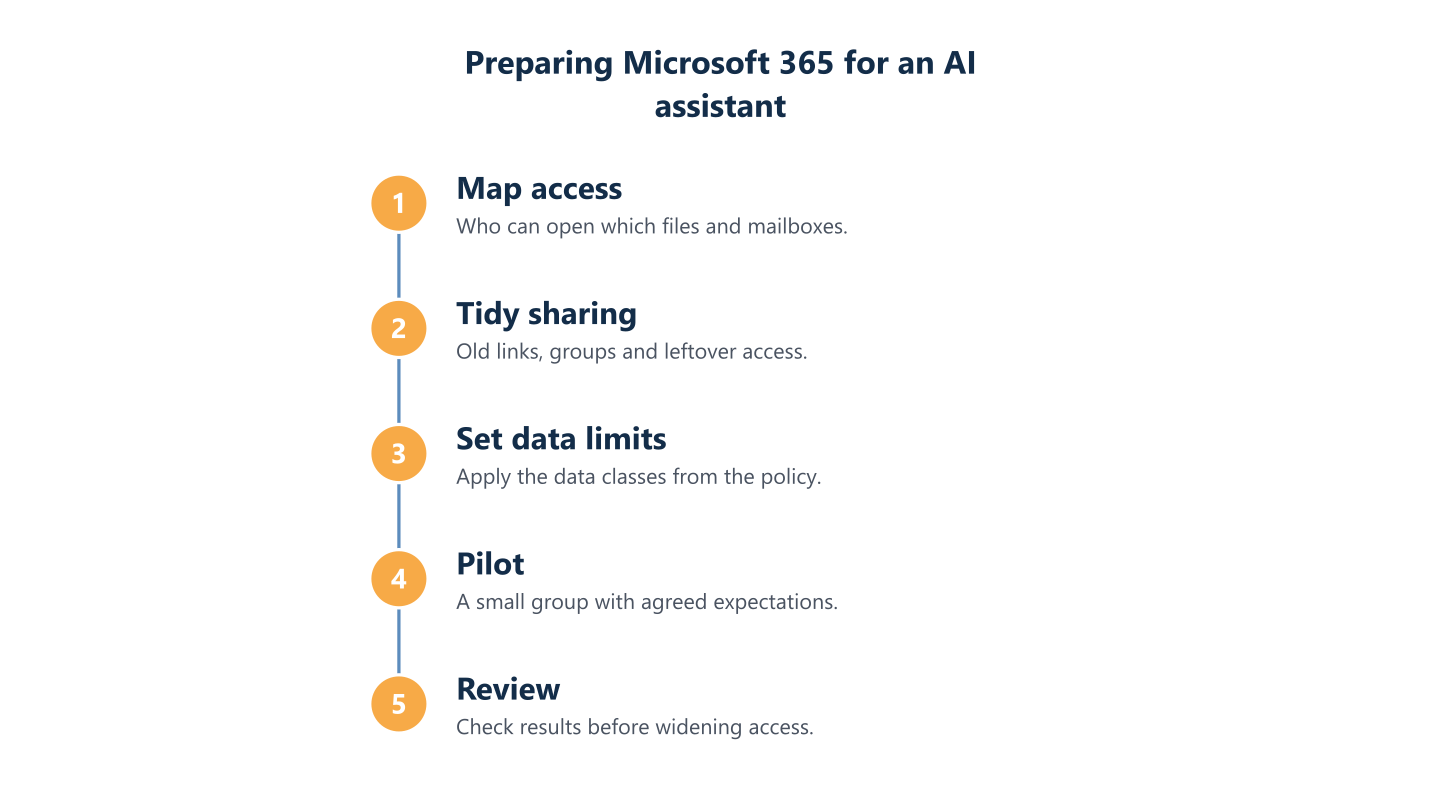
Read the steps as text
Map access, tidy sharing, set data limits, pilot, review
Human review, logging and vendor terms
Who checks an AI draft before it reaches a client, what record of AI use is worth keeping, and what has the vendor agreed to do with your data? A policy that answers these three is more usable than one that only bans things. In practice, treat responsibility for an output as staying with the person and the organisation that use it, whichever tool produced the draft.
Records help you see which tools are in use and who approved them, but they should stay proportionate. Vendor questions belong in the policy because an approved AI tools list is only as sound as the terms behind each entry. The technical questions to put to a vendor are listed below. Contract and legal review belongs with your own adviser, and we do not audit legal compliance or certify anything.
An approved tool is one whose data terms you have read for the plan you actually use, not one that is merely popular.
Human in the loop: who checks what
Name who reviews AI output for each type of work, and require a check before anything goes to a client, is published or is acted on. The policy can say it: the author and a second reader check marketing copy, the sender checks a client email, and someone who can verify against the source checks figures or a summary of a document.
Reviewers should check facts, names, numbers and tone, and they should feel free to reject a draft. Fluent text is not evidence that it is right. Where the output affects a person, such as hiring or performance, decide whether AI may be used at all.
What to log and what to keep proportionate
Decide what to record, modestly. A useful minimum is a list of the AI tools in use, who approved each one, the date, which data classes it may touch and who owns the vendor relationship.
Beyond that, check what usage information each tool actually provides, such as admin reports or audit information, rather than assuming it exists. The answer varies by product and plan. Logging has a cost: records of what people typed can themselves hold personal or confidential data, and monitoring staff raises privacy questions. Tell staff what is recorded and why, and take advice from your own adviser on employee monitoring.
Vendor and data-processing questions to ask
Ask each vendor the same short set of questions and note the answers beside the tool on your approved list:
- How is our data used, and is it used to improve models?
- How long are prompts and outputs kept, and can we delete them?
- Where is data processed, and which sub-processors are involved?
- Which data-processing terms apply, and do they differ between free and business plans?
Check the terms for the plan you would use, and have your own adviser review the contract.
Training, incidents and keeping the policy current
A policy that nobody remembers protects nothing, so the last step is turning it into habits. Short training, a calm route for reporting mistakes and a fixed review date do most of that work. This is AI governance for small business at a practical scale: a few clear rules, named people and a rhythm, rather than a committee.
Where the rules touch identity, access and data protection settings, our cybersecurity work is relevant. For deciding where AI and workflow automation fit in your processes, the Automation and AI service covers AI and workflow automation consulting. BlueNova IT can also work alongside your own IT team, so the technical settings and your own written policy line up. What the work covers is agreed with each organisation, and we do not promise outcomes.
Short training that uses real examples
Train with short, concrete examples from your own work rather than a long slide deck. Three or four real scenarios are enough: can this customer email be pasted into a chatbot, which tool do you use for a first draft, what do you do with an answer you cannot verify.
Back the session with a one-page summary of the policy in plain words, and a ChatGPT policy for employees that is explicit about personal accounts. Give people a named contact for questions and say that asking is welcome. Repeat the session when tools or rules change, and for new starters.
When something goes wrong: a no-blame incident route
Agree in advance what happens if sensitive data goes into the wrong tool, such as client details pasted into a personal chatbot account. Name who to tell, ask for a report as soon as the slip is noticed, and list what is checked afterwards: what was shared, in which tool and account, whether the vendor lets you delete it and whether anyone outside the organisation needs to be informed.
Take advice from your own adviser on any notification duties. Keep the route no-blame, because people who fear punishment hide mistakes, and a hidden mistake is harder to contain. If the same slip keeps appearing, change the policy or the training.
A review rhythm and a note on regulation
Review the policy on a fixed schedule and after any significant change in tools, vendor terms or rules. Put a review date and an owner in the document, and review the approved tools list at the same time, because it dates fastest.
For the EU AI Act and GDPR, check the current rules and your national authority. This guide is general information, not legal advice, and following a template does not make an organisation compliant. If you are already working on security governance, our guide to NIS2 for SMEs covers first steps on a related topic.
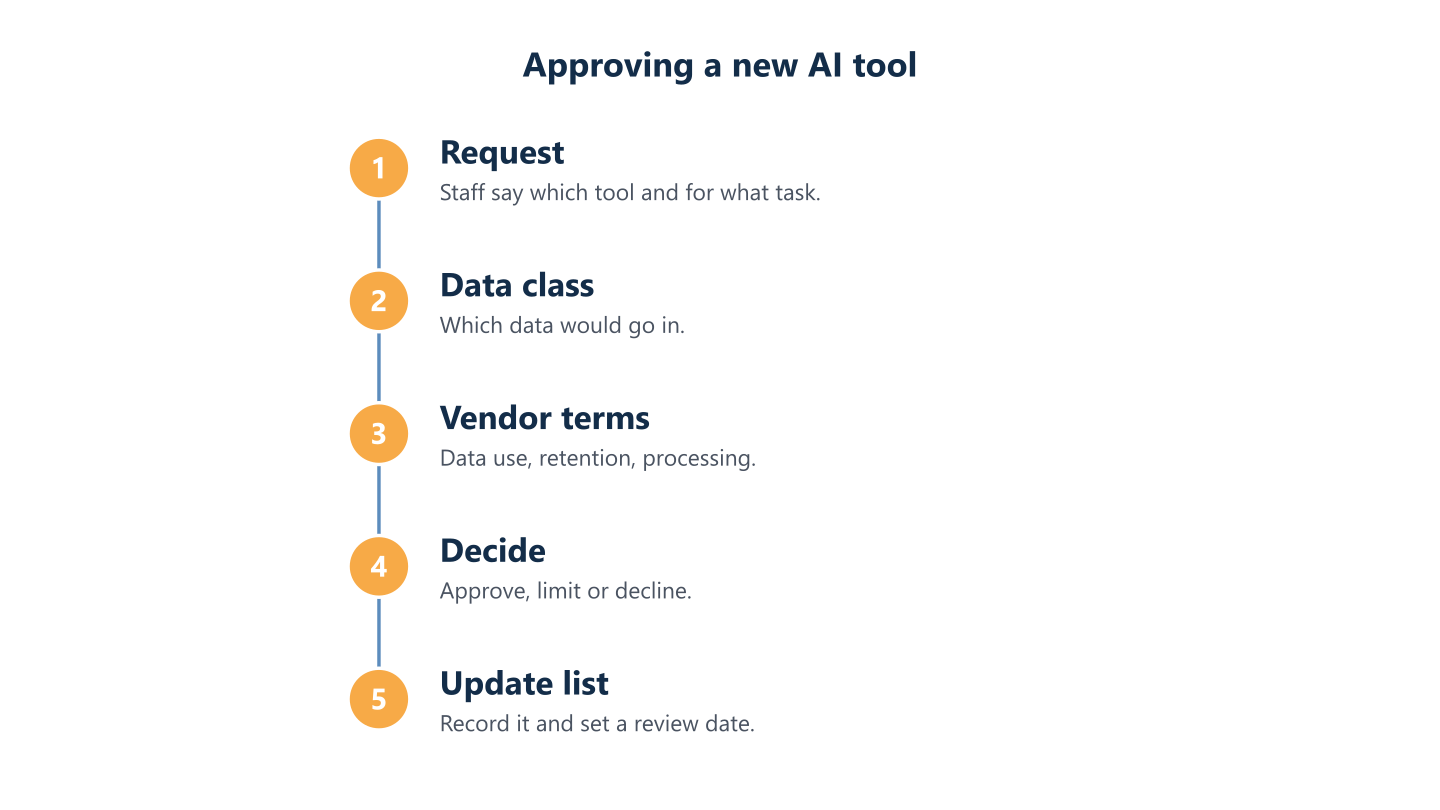
Read the steps as text
Request, data class check, vendor terms check, decision, list update
A workable AI use policy is short, specific and reviewed. It starts from the tools people already use, sets data limits they can remember and names who checks the output. Before enabling an assistant such as Copilot, tidy access first, and check vendor documentation and current rules instead of relying on assumptions. BlueNova IT supports small and midsize organisations in English and Spanish, Monday to Friday, 09:00-18:00 CET. Tell us about your situation and we can discuss what support fits.