
A digital transformation roadmap for small business is a phased plan that sets out what to change first and why: diagnose how the business works today, prioritise against measurable goals, choose tools, test them in a pilot, then scale and review. The order and pace depend on your business, your priorities and your resources.
Small firms often stall not for lack of software but because nobody has agreed which process to fix first. This guide walks through five phases in order, with a check before each move, so effort and budget are spread rather than staked on one large project.
Questions about this guide? Talk it through with us
What a digital transformation roadmap is and how the phases fit together
A digital transformation roadmap says which parts of the business to change, in what order, and how you will know it worked. It is not a software purchase, and it goes further than scanning paperwork.
| Phase | Goal | Typical outputs (indicative) | Common risks | What to check before moving on |
|---|---|---|---|---|
| 1-2. Diagnose and prioritise | Map today’s work, rank changes | Process list, ranked priorities | Vague goals | Starting point recorded |
| 3. Tools and foundations | Choose tools, secure the base | Shortlist, backup plan | Tool-led choices | A restore has been tested |
| 4. Pilot | Test on a small scale | Pilot results | Skipped training | Exit rule agreed |
| 5. Rollout and review | Extend and measure | Indicators, review dates | Drift after launch | Owners named |
BlueNova IT offers IT consulting and Automation and AI (covering AI and workflow automation) among its services, with scope agreed with each organisation. This guide starts from business processes and adoption; our IT roadmap for small business covers the technical inventory and a 12-month plan.
Digitisation versus digital transformation
Digitisation moves information from paper to digital form, such as a scanned contract or an invoice sent as a PDF. Digital transformation redesigns how work gets done, supported by software and data. Scanning delivery notes saves shelf space, but if someone still retypes them into a spreadsheet, the process has not changed. Transformation asks why the note exists, who needs it and whether the data could flow straight into invoicing. Digitisation is often a sensible first step, but the roadmap should say where it ends and the redesign begins.
What a roadmap should contain, and what it should not
A roadmap orders initiatives over time, each with a goal, an owner and a review point; it is not a shopping list of tools. A useful entry reads like "reduce rework in quoting, owned by the sales lead, reviewed after the pilot". It should also record dependencies, such as needing clean customer data before an automation can run, and what you have chosen not to do yet. Avoid lists of product names without the problem each one solves, and dates so tight that nobody can adjust them.
Who should lead it in a small business
Working in phases lets a small team learn, correct course and work in steps small enough to review before the next one starts. Someone from the business, not only from IT, should own the roadmap: typically the owner or a manager who can set priorities and free up people’s time. Where there is no full in-house IT, an outside adviser can support the work, but the decisions stay with you. Name one accountable person for each phase and keep the group small enough to meet regularly.
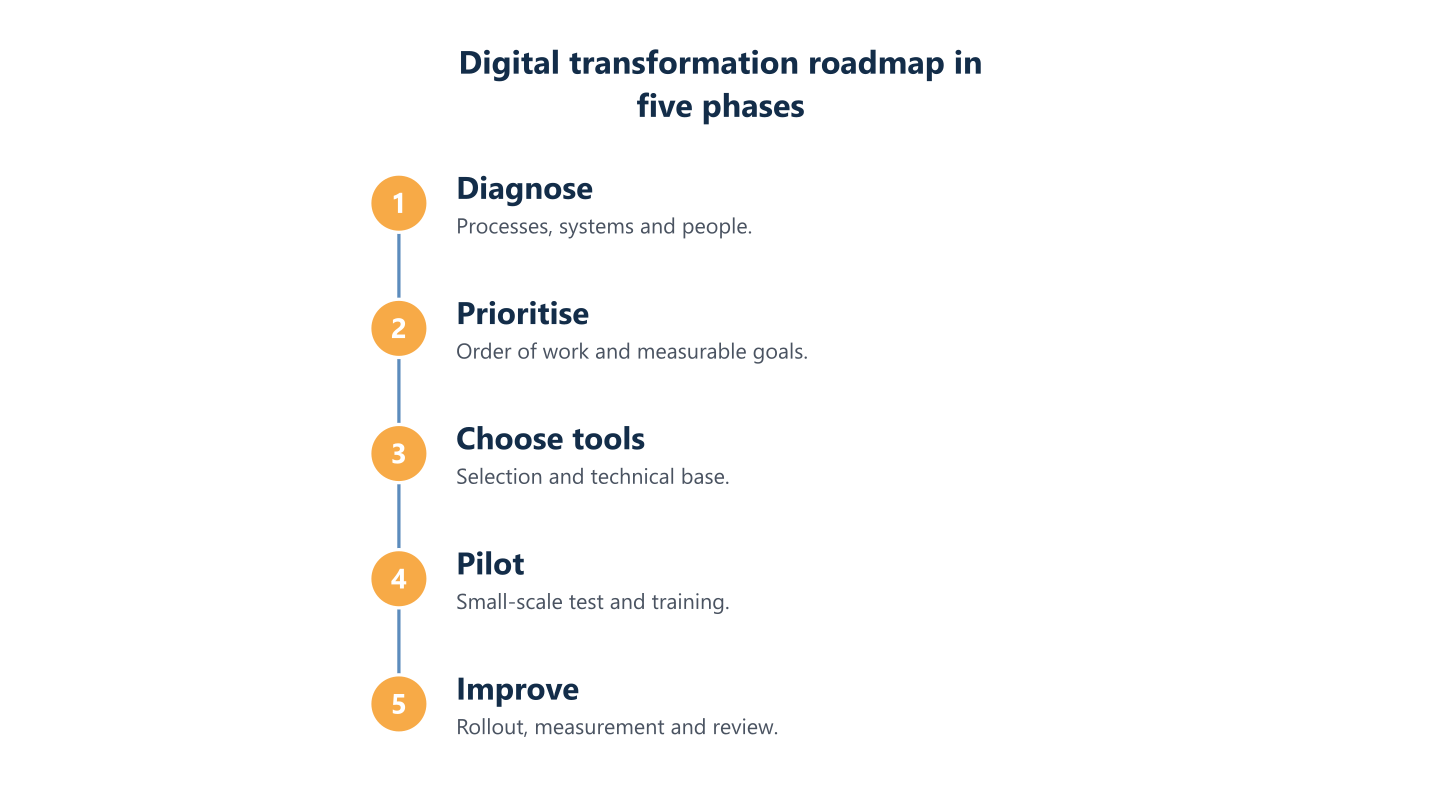
Read the steps as text
Diagnose, prioritise, choose tools, pilot, improve
Phases 1 and 2: diagnose your processes and set priorities
Digitising a process works best when it begins with an honest picture of today. Work through these steps in order:
- Map how the business works now: the main processes, who does them, which tools they use and where work stalls.
- Record a starting point, such as time spent or customer waiting, so you can compare later.
- Score each process on a few simple criteria and rank the results.
- Turn the top candidates into measurable goals, each with an owner.
- Agree the budget in plain terms: the effort, licences and staff time you can commit, and what would make you pause.
- Write down what waits for a later phase.
BlueNova IT consulting can help structure this stage. Where a company already has IT staff, the work can be shared through co-managed IT, run jointly with your own team. Scope is agreed per organisation.
Take stock of processes, tools and people
List the key processes (sales, purchasing, invoicing, customer service) and note where paper, spreadsheets or knowledge held by one person are involved. Ask the people who do the work, not only managers, because the real process often differs from the documented one. For each, note the inputs, the hand-offs between people, the tools used and the point where work usually waits. Include shared mailboxes and personal spreadsheets; they are often where the business actually runs. One page per process is usually enough.
Score processes and write measurable goals
Score each process on two or three simple criteria, such as time spent, the cost of a mistake and the effort to change it, then rank the results. Low, medium and high is precise enough. Replace vague aims such as "be more modern" with indicators you can compare before and after, for example the days taken to issue an invoice or how often the same data is typed twice. Processes that hurt a lot and are easy to change usually make the best pilots.
Budget, constraints and what to leave for later
Be explicit about constraints: money, staff time, seasonal peaks and contracts that cannot change yet. At this stage budget is easier to discuss in qualitative terms, separating one-off effort from recurring costs, such as licences that grow with headcount when priced per user. Allow for training and for your own people’s time, which small teams often forget. Then keep a "later" list for good ideas that do not meet the criteria now. If you plan to seek public funding, check the current call.
Phase 3: choose tools and prepare the technical foundations
Once priorities are set, tools follow. Check these points before you commit:
- Fit: does the tool match your process, or does the process have to bend to it?
- Type: standard software, a configurable platform or a custom build, each trading speed against fit and upkeep.
- Foundations: where data will live, who can reach it, and how it is backed up and restored.
- Security: access control and data protection treated as design requirements, not add-ons.
- Connections: how systems exchange data and how existing records will move across.
BlueNova IT services include cloud and Microsoft 365, cybersecurity, and networks and infrastructure, with scope agreed per organisation.
Standard, configurable or custom software
Start from the process you ranked highest and ask how much change each option demands of your team. Standard software is quicker to adopt and lighter to maintain, but you accept its way of working. Configurable platforms adapt to your steps with some set-up. Custom builds fit exactly but need ongoing upkeep and depend on whoever wrote them. For most small businesses, standard or configurable is the sensible starting point; custom work needs a clear reason, such as a process that gives you a real edge and that no existing product supports.
Cloud, identities, backups and security from the start
Name who is responsible for backups and keep a list of the services in use and who administers each; test a restore rather than assuming it works. Use individual accounts with multi-factor sign-in rather than shared logins, and give people only the access their role needs. Cloud services move some responsibilities to the provider, but not your own choices about who gets access. In most cases these basics take less effort before the first tool goes live than after it.
Integration between systems and data migration
Map which systems must exchange data and whether they connect through built-in integrations or need custom work. Before migrating, clean the data: remove duplicates, agree field names and decide what to archive. Run a trial import and compare the results with the source. Keep a record of what was moved, when and who approved it. Rules such as the GDPR may apply to the personal data you move; this is general information, not legal advice, so take advice suited to your situation.
Phase 4: run a pilot, train the team and decide what happens next
A pilot tests one change at small scale before the business commits to it. Pick a single process, a small group and a short, fixed period; prepare the people involved; and decide what you will measure against the starting point from phase 2. Keep the old way of working available until the pilot has earned the right to replace it.
Agree the exit rule before the pilot starts: what result means scale, what means adjust and what means stop.
Where a pilot involves workflow automation or AI, the Automation and AI service at BlueNova IT covers that area, and you can read more in our guide to AI automation. On-site or installation work, where needed, is confirmed for each project.
Choosing a pilot that is small enough to learn from
Pick one process, team or site where a failure has limited impact and the result is easy to compare with the starting point. Invoicing for one product line suits a pilot better than the whole finance function, and a single branch better than every location at once. The pilot should be real enough to expose problems with data, habits and hand-offs, yet small enough that people can still work the old way if needed. Choose a team open to change, with a manager willing to give honest feedback.
Training and communication that people will use
Combine short training sessions, written instructions and a named point of contact, and involve the people affected from the start. Explain why the change is happening and what it means for daily tasks, not only which buttons to press. Ask a few users to test early and help shape the instructions, since they notice problems that managers miss. Keep guidance where people will find it, and revisit it after the first weeks, when real questions appear. Resistance often points to a gap in the process, so listen before you correct.
Criteria to scale, adjust or stop
Agree before the pilot begins what outcome justifies scaling, what calls for adjustment and when it is sensible to stop. Scale when the indicator from phase 2 has moved in the right direction and users work comfortably without constant help. Adjust when results are mixed but the cause is clear, such as unclear instructions or a missing integration, then repeat a short cycle. Stop when the problem persists or the tool does not fit the process. Stopping is a useful result: it is cheaper to learn this in a pilot than after a full rollout.
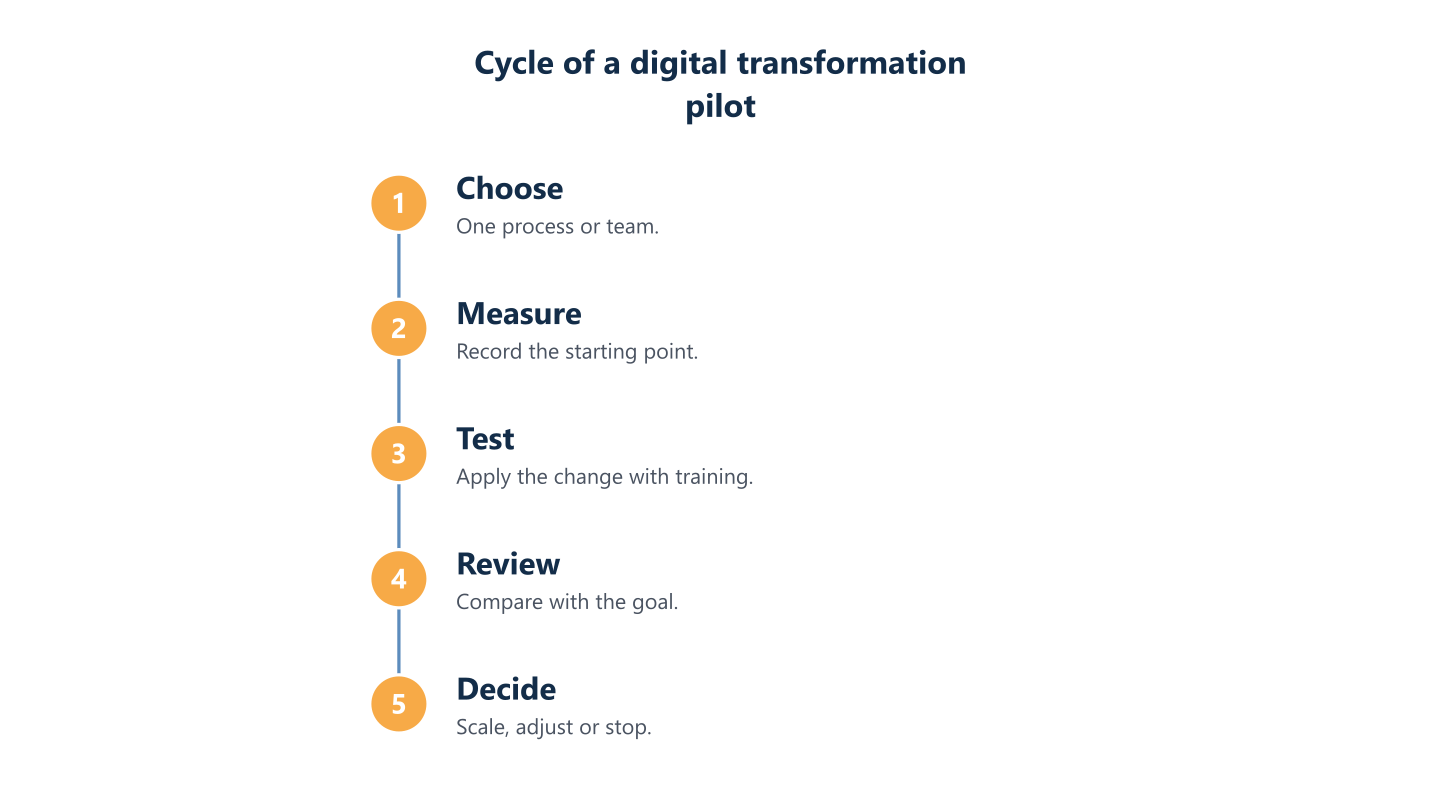
Read the steps as text
Choose, measure, test, review and decide whether to scale, adjust or stop
Phase 5: roll out, measure and keep improving
Rollouts can stall at the first hand-off, when the pilot team moves on and nobody owns the next wave. Extend the change in stages, name an owner for each one and keep reviewing the indicators you set in phase 2. Co-managed IT can help at this point: BlueNova IT offers it regularly, and has for several years, working alongside a client’s own team, as well as managed IT services. The division of responsibilities and the scope are agreed per organisation. The aim is steady improvement rather than a finished project, so the roadmap stays a living document that you revisit as priorities and tools change.
Gradual rollout with a way back
Extend the change in waves and plan a way back if something fails; limit the overlap between old and new systems to a planned period. Give each wave a cut-over moment agreed with the team and a short list of checks afterwards. Before each wave, confirm that backups are current and that you know how to restore the previous state, as our guide to backup and recovery explains. A brief overlap helps you compare results, but a long one doubles the work and leaves two sets of data to reconcile.
Indicators and a review rhythm
Review the indicators set in phase 2 at fixed intervals and update the roadmap with what you have learned. A monthly or quarterly rhythm is typical, depending on how fast the business changes. Keep the review short: compare each indicator with the starting point, ask users what slows them down, and decide whether the next initiative still deserves its place. Write down the outcome, including items you drop. Share a brief summary with the whole team, so people see the effect of their effort.
Common mistakes, and when outside support helps
Check for the usual mistakes: choosing a tool without asking the team, naming no owner, using systems that do not connect, and stopping after the first month. Others include setting goals nobody measures, skipping training and leaving security for later. An outside adviser can help when nobody has the time or experience to run a phase, or when you want a second view on a tool choice. The decisions remain yours, and support works best when roles are written down.
Digital transformation in a small business works best in small steps taken in the right order, and the roadmap should be reviewed and adjusted as you learn. Begin with the process that costs the most time or causes the most errors, record where it stands today and run a small pilot before anything wider. For the technical side, the 12-month IT roadmap guide mentioned earlier covers devices, software and security. If you want a second opinion, BlueNova IT offers IT consulting and Automation and AI support in English and Spanish, Monday to Friday, 09:00-18:00 CET.