Before you choose a door access system, settle six IT questions: who administers it and with which accounts, how readers and controllers connect and are powered, what each door does when power or the network fails, how badges are issued and withdrawn, what the logs record, and which documents the installer hands over. The equipment list comes after those answers, not before.
Door access is often bought as a facilities project. Once the controller sits on your network and the badge list has to follow your staff changes, it is also an IT project, and the gaps tend to appear after installation: an admin account in the installer’s name, a leaver whose badge still opens the office, a door that nobody has tested without power. This checklist is general and provider-neutral. It does not repeat cameras, PoE sizing, network separation, firmware or footage retention, which our guide to CCTV network requirements already covers; it concentrates on what is specific to doors.
Questions about this guide? Talk it through with us
Which type of system are you actually choosing?
Suppliers use the same words for very different designs, so name the design before comparing quotes. The three common ones ask different things of your IT. The table is a planning aid, not a ranking, and the right answer depends on the number of doors, the number of sites and who will look after the system.
| Criteria | Controller on site | Cloud-managed | Standalone locks |
|---|---|---|---|
| Where the badge list lives | On a controller or server you own | In the vendor’s service | On each lock, set locally |
| What it asks of IT | Network, power, updates, backup of settings | Internet access, vendor account, subscription | Someone visiting each door to make changes |
| Multi-site fit | Needs a plan per site | Usually one view for all sites, depending on the product | Weak: changes are door by door |
| Main risk to plan for | Nobody patches or restores it | Service, price or contract changes | Leavers keep access longer than intended |
If you have several offices and no full in-house IT, the question to settle early is who will make a change on a Tuesday afternoon when a new starter arrives. Our physical security service looks at this link between doors and IT, and the first step is a list of what is already installed at each site, who maintains it and which contracts apply.
Who will administer the system, and with which accounts?
An access system has administrators just like a server does, and they can open every door. Decide who they are before installation, not after a first problem.
Admin accounts and the vendor portal belong to your company
Create the administrator and, for cloud systems, the vendor portal account in your company’s name, using a shared role mailbox or named managers, and record who holds them. If the only administrator is the installer, you cannot add a badge, read the log or change supplier without them. Use named accounts rather than one shared login, turn on a second sign-in step where the product offers it, and decide who holds the recovery details. The same discipline applies as for any business system, and our Microsoft 365 security baseline checklist shows it for admin accounts in general.
Installer and vendor access: limited and recorded
Installers and maintainers often need remote access to the controller. Ask who can approve it and how it is switched off after each job, and ask the supplier to list every account and remote path it has created. A standing remote-support login that nobody remembers is the access-control equivalent of a spare key under the mat. Remote viewing of cameras is covered in the CCTV guide; here the point is who can change who may open your doors.
How do readers, controllers and locks connect and get power?
Each door is a small chain of devices: reader, controller, lock and a power supply. IT needs to know every link, because a fault anywhere in the chain is a door that does not open or does not lock.
Readers to controller: ask which protocol and what happens at replacement
Ask which interface the readers use to talk to the controller. OSDP is an open protocol described by the Security Industry Association (SIA) in its OSDP overview and standardised as IEC 60839-11-5 for communication between access control units and their peripheral devices, such as readers. If a proposal relies on a proprietary or older interface, ask what that means for replacing readers from another maker later, and whether the link between reader and controller can be protected. These are questions for the supplier, and the answers depend on the products.
Controllers on the network: address, time and updates
A networked controller needs a fixed or reserved address, a time source so that log entries carry the right time, and an owner for firmware updates. Plan where the controller is mounted, because a controller in a locked cabinet is harder to tamper with than one on a hallway wall. For separation from staff laptops and servers, follow the segmentation points in our CCTV guide; the same reasoning applies to door controllers. The UK National Protective Security Authority (NPSA) and National Cyber Security Centre address these systems in their Network Connected Security Technologies guidance. Use that guidance to frame the network-security questions you put to the supplier.
Power at the door and backup power
Electric locks draw power at the door, and some readers or controllers are powered over the network cable. Ask which devices depend on which power supply, whether a battery backup is included, and how long it is expected to carry the doors you care about most. Add the door controllers and their power supplies to the same asset list as your switches, so a planned power cut is not a surprise at the entrance. Structured cabling decisions made now are hard to change later, which is why the structured cabling planning guide is worth reading before the installer starts drilling.
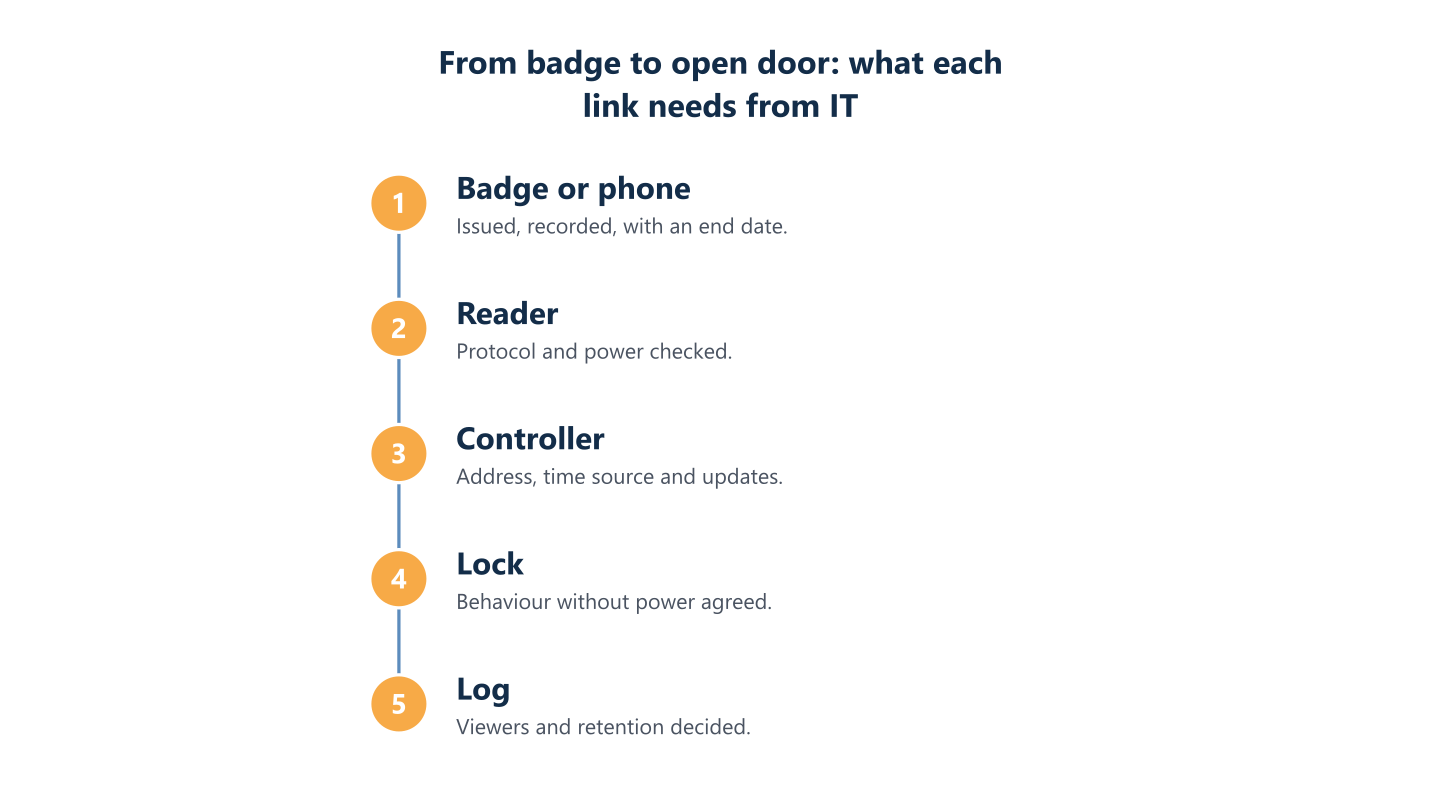
Read the steps as text
Controller, lock and log, with what IT must plan at each step
What should each door do when power or the network fails?
This question is easy to skip, and it is a safety question as well as an IT one. Write it down for every door and let qualified people check it. The CCTV guide mentions it in one sentence; for doors it deserves a table of its own.
- Name the door and say what it protects: street entrance, open-plan floor, comms room, stockroom.
- Decide the lock behaviour without power. A fail-safe lock typically releases on loss of power; a fail-secure lock typically stays secured on the access side. These labels do not tell you whether people can leave: some hardware permits mechanical free egress in either case. Have the installer document ingress and emergency egress separately.
- Decide how someone leaves: a manual release, a push button or a panic bar, as the safety rules for that door require.
- Ask whether the controller keeps working without the network or the internet, and whether it still holds the current badge list locally.
- Agree what happens when the fire alarm sounds.
- Test it during a planned window and record the result.
Fire and safety requirements differ by country and by building, so have the installer and a qualified person confirm the choice for each door. This guide is not a safety or legal opinion.
How are badges added and removed when people join, move or leave?
A badge is a credential, and credentials need a lifecycle. Access problems in small organisations are often list-keeping failures rather than technical ones: for example, a leaver’s badge that still opens the door months later.
One owner, one list, one routine
Name one person who approves requests and one who makes the change, even in a small team. Record who holds each badge, which doors it opens and when it expires. Contractors and visitors should get temporary credentials with an end date, not a copy of someone else’s badge. Define the lost-badge routine: who is told, how fast the badge is blocked, and how a replacement is issued. Our IT onboarding and offboarding checklist already mentions collecting the badge and keys; the access list should be part of the same routine.
A planning question: should the badge list follow your user directory?
Some products can take their user list from a company directory, such as the one behind your Microsoft 365 accounts, while others need every change typed in by hand. Whether that is possible depends on the product and on what you are willing to connect. It is a planning question rather than a requirement: if the system can follow the directory, decide who owns that connection; if not, decide who removes a leaver’s badge, by when, and how that is checked. Either way, someone has to be responsible, and the answer should be written down before the first employee leaves.
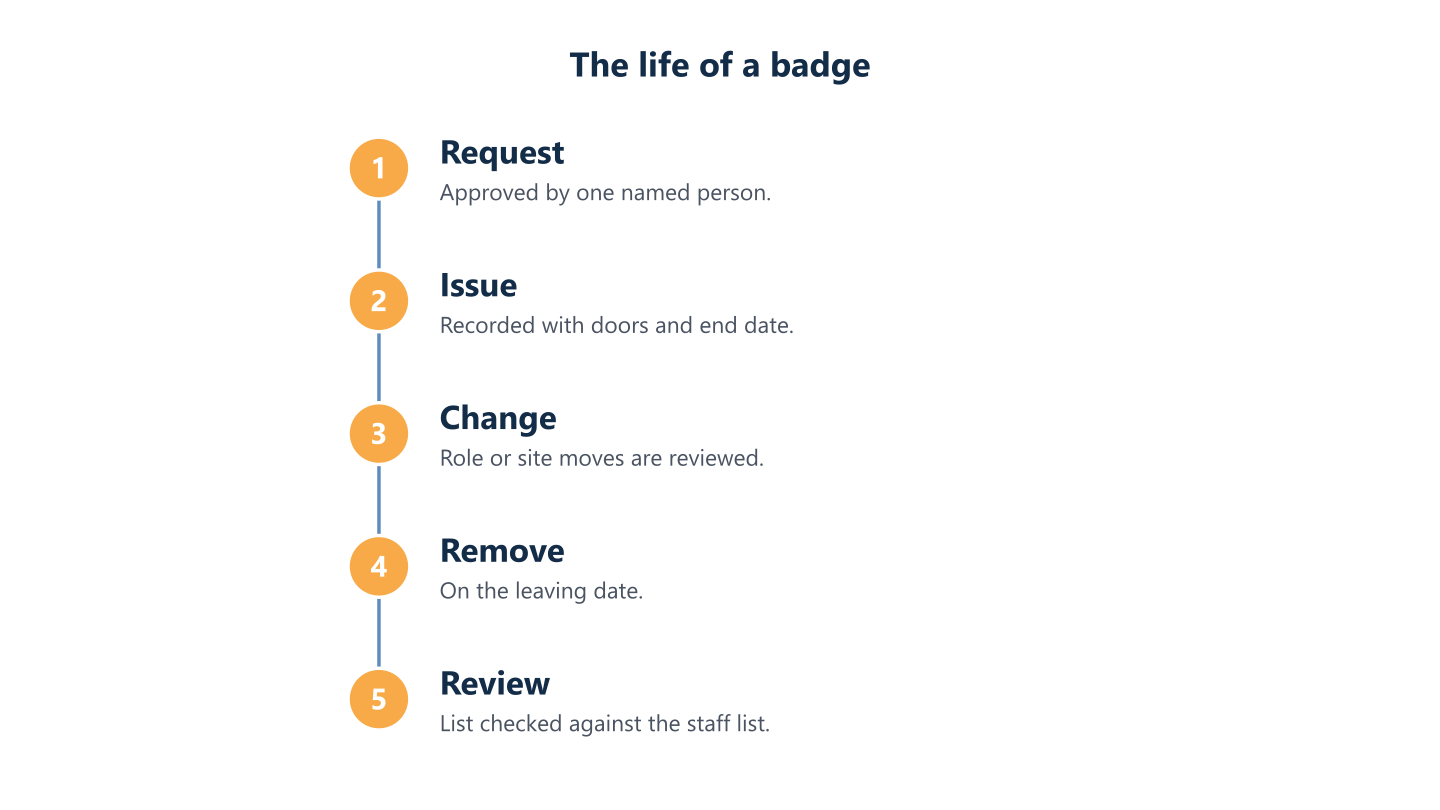
Read the steps as text
Removal and review
What do the logs record, and who may see them?
Door logs show who entered where and when, which makes them useful after an incident and sensitive in everyday use. Decide who may read the log and how entries are exported, and check that the controller’s clock is correct, because a log with the wrong time is hard to rely on. Retention periods, what staff must be told and what signage is needed depend on national law, so check your own country’s rules and your data protection authority, and take legal advice where needed. The retention and viewing questions in the CCTV guide apply to door logs too. We do not give legal advice, and this guide is not legal advice.
What should the installer hand over, and who maintains the system afterwards?
A system that works on the day of installation but has no documents is a problem waiting for the next supplier change. Ask for a handover pack and keep it where your IT team can reach it, not only in the installer’s files.
- A door list: location, reader, lock type, behaviour without power, release method.
- Controller and reader models, firmware versions and the owner of updates.
- Network details: addresses, the network segment used and any remote-access path.
- Account list: administrators, vendor portal, who holds recovery details.
- The badge list and access groups, plus a way to export them.
- Maintenance and support contracts, warranty terms and renewal dates.
Then ask the exit question: if you end the contract or the cloud subscription, can you export your badge list and logs in a usable form, and what happens to the doors? Where a project allows it, BlueNova IT can carry out the installation itself, and whether that applies is confirmed per project; the inventory and the network connection map are useful whoever does the work. We do not provide legal advice and scope is agreed per organisation.
Ten questions to put to any supplier
- Is the controller on site or in the cloud, and what does each need from our network?
- Who owns the admin accounts and the vendor portal, and can we hold them?
- Which protocol links readers and controllers, and can we replace readers later?
- What does each door do without power and without the network?
- Does the controller keep the current badge list locally?
- How are badges removed when someone leaves, and can the list follow our user directory?
- How are firmware updates handled, and by whom?
- What do the logs hold, and how are they exported?
- Which documents do we receive at handover?
- What happens to our data if we end the contract?
A sound plan starts with the type of system, then covers administration, connections and power, behaviour in failure, the badge lifecycle, logs and handover. Each point needs an owner and a record, or it drifts. If you want to talk it through, our physical security work begins with your premises, your existing equipment and who is responsible for it. We support clients in English and Spanish, Monday to Friday 09:00-18:00 CET.