
Managed IT services pricing depends on the support scope, the organisation’s users and systems, and how responsibilities are divided. Providers may price per user, per device, through a fixed agreed fee or by time and materials. Compare what each proposal covers, excludes and assumes; the scope and conditions should be agreed with each organisation.
Many buyers start their search expecting a single standard rate, then find that two proposals for what looks like the same support can differ considerably once the detail is examined. That gap usually comes down to scope: what is included, who handles which tasks, and how exceptions or growth are priced. Understanding the common pricing models, and the factors that influence a quote, puts you in a stronger position to ask the right questions. This article walks through how managed IT services pricing is typically structured, what to check before accepting a proposal, and how to compare offers from different providers on a fair basis rather than on a headline figure alone.
Questions about this guide? Talk it through with us
How managed IT services pricing works
A managed IT services fee is meant to reflect an agreed scope of work, not a fixed market rate. Two organisations of similar size can receive very different quotes because their systems, support expectations and existing IT arrangements are not the same. There is no single managed IT services pricing example that applies universally, which is why providers typically need a conversation before putting a figure forward. At Bluenova IT, we do not publish a standard managed IT services rate, because the figure would not mean much without context. Instead, we discuss an organisation’s people, systems and priorities, including day-to-day IT support and maintenance, before agreeing the specific scope and conditions. This applies whether you need standalone managed IT services or a co-managed arrangement alongside your existing team.| Pricing approach | Common basis | What to clarify | Useful comparison question |
|---|---|---|---|
| Per-user | Number of staff supported | Which tools and support channels are included per user | "Does this cover every user equally, or are some tiered?" |
| Per-device | Number of endpoints, servers or other systems | How shared, specialist or legacy devices are counted | "What happens when device numbers change mid-term?" |
| Fixed-fee | An agreed, defined scope of work | What falls outside scope and how exceptions are priced | "What triggers an additional charge or a scope review?" |
| Time and materials | Hours worked plus any materials used | Hourly rates, minimum call-outs and reporting detail | "How is time tracked and approved before billing?" |
What a managed IT services fee represents
A provider may price an agreed service scope rather than a standard package that fits every organisation. The fee generally reflects the tasks, responsibilities and support hours that have been discussed and confirmed, not a generic bundle pulled from a price list. This is why asking for a managed IT services pricing example from a provider’s past work can be misleading unless the comparison organisation had a genuinely similar environment, user count and set of responsibilities. Treat any example as illustrative of structure, not as a benchmark you should expect to match. The more clearly a quote states what is included, the easier it becomes to judge whether the fee is reasonable for your situation.Why there is no universal managed IT services price
The pricing basis can be linked to users, devices, a defined scope or the time and materials involved, and each basis produces a different number even for comparable organisations. A company with twenty users and simple infrastructure will not be priced the same as a company with twenty users spread across several sites with legacy systems and stricter compliance needs. Searching for IT services rates per hour or a flat managed services figure online can give a general sense of the market, but it will not reflect your specific requirements. Providers generally need details about your environment before they can price the work responsibly, which is why an initial conversation is a normal part of the process rather than a delay tactic.How scope and responsibilities shape a proposal
A proposal is easier to assess when it makes responsibilities, assumptions and exclusions clear. If a quote simply states a fee without describing what happens when something falls outside normal support, you are left guessing about future costs. Look for language that specifies who handles updates, who manages vendor relationships, and how incidents outside business hours are addressed. A well-structured proposal should also state any assumptions it has made about your current environment, such as existing licensing or network setup, since incorrect assumptions can lead to disputes later. Scope clarity tends to matter more than the headline fee when comparing offers from different providers.Common managed IT services pricing models
Providers typically structure their pricing around one of a small number of recognised models, though the detail within each can vary considerably. Understanding these models helps you read a proposal more critically and ask better questions, rather than comparing figures without context. None of these models by itself tells you what is actually included in the support; that detail has to come from the written scope. Bluenova IT can work jointly with an organisation’s own IT team through co-managed IT, an approach we have offered for several years alongside standalone managed support. The specific responsibilities in any arrangement, and any on-site or installation work, need to be confirmed for each project; we do not treat a particular pricing model or set of inclusions as standard across clients.- Per-user pricing, where the fee scales with the number of staff receiving support.
- Per-device pricing, where the fee scales with the number of endpoints, servers or other systems covered.
- Fixed-fee pricing, where a defined scope of work is agreed for a set recurring charge.
- Time-and-materials pricing, where work is billed based on hours and any materials used.
- Co-managed pricing, where responsibilities and costs are divided between the provider and the organisation’s internal IT team.
Per-user and per-device pricing
Per-user pricing can be straightforward to relate to a workforce, but clarify which support responsibilities it covers. Some providers price per user to cover helpdesk support, device management and account administration, while infrastructure, servers or network equipment are priced separately. Others fold everything into a single per-user figure. Ask explicitly whether shared resources, such as a file server or a shared printer, are counted separately or absorbed into the per-user charge. If your organisation has contractors, seasonal staff or part-time workers, also confirm how they are counted, since inconsistent definitions of a "user" are a common source of confusion when comparing quotes from different providers.Fixed-fee pricing for an agreed scope
Per-device pricing depends on which devices are counted and how shared or specialist systems are treated. A laptop and a networked printer are not equivalent in terms of support effort, yet some per-device models price them the same way, while others apply different weightings. Specialist equipment, such as point-of-sale systems or manufacturing controllers, may need separate agreements entirely. Fixed-fee arrangements built around a defined scope avoid some of this ambiguity by setting a single charge for an agreed set of responsibilities, but they require a precise written description of that scope so that both parties know what triggers additional cost when circumstances change.Time-and-materials pricing
Fixed-scope and time-and-materials approaches need clear definitions of included work, approvals and changes. Time-and-materials pricing can suit organisations with occasional or unpredictable IT needs, since you pay for actual hours worked rather than a recurring fee for ongoing cover. The trade-off is less cost predictability, so ask about hourly rates, minimum charges, and whether remote and on-site work are billed differently. A managed IT services calculator offered by some providers can give a rough indication of likely costs under this model, but treat any such tool as a starting point for discussion rather than a binding estimate for your organisation.Co-managed IT pricing
Co-managed arrangements should describe how the provider and the organisation’s IT team divide responsibilities. Pricing in this model often reflects the portion of work the external provider takes on, which can range from specialist cybersecurity tasks to overflow helpdesk support or infrastructure projects your internal team does not have capacity for. Because the division of labour is specific to each organisation, co-managed pricing tends to be more bespoke than standard per-user or per-device models. For more detail on how this compares with fully outsourced support, see our guide on co-managed IT versus managed IT and break-fix, which explains which model fits different internal team structures.What can affect a managed IT services quote
Several factors shape why one organisation receives a different quote from another, even for seemingly similar support. None of these factors leads to a fixed or predictable fee on its own; they combine in ways that depend on your specific environment and priorities. Knowing what affects managed IT services pricing in general terms helps you prepare better information before requesting proposals and avoid surprises once a provider begins assessing your environment. When we discuss requirements with a prospective client, we typically review the IT environment and priorities together, covering support needs, cybersecurity, cloud and Microsoft 365, and networks and infrastructure, as well as how physical security systems connect with the IT environment. The organisation-specific scope and any on-site work are then confirmed directly rather than assumed in advance.- Number and location of users, including whether teams are centralised or distributed across multiple sites.
- Types and age of devices, from laptops and desktops to servers and networking equipment.
- Complexity of the IT environment, including cloud services, legacy systems and specialist software.
- Current support arrangements and whether an internal IT team already handles part of the workload.
- Cybersecurity requirements, including existing controls and any regulatory considerations relevant to your sector.
- Preferred division of responsibilities between the provider and your own staff.
Users, devices and the IT environment
The number and types of users, devices, sites and business systems can affect the work required. A single-site business with standard laptops and a handful of cloud applications presents a different support challenge from a multi-site organisation running specialist software, on-premises servers and a mix of personal and company-owned devices. Providers generally need to understand this environment in detail before pricing accurately, which is one reason that comparing IT services rates per hour across different providers without describing your own setup rarely produces a meaningful comparison. The more accurately you can describe your environment upfront, the more reliable the resulting quotes are likely to be.Support needs and existing responsibilities
Support needs, existing IT arrangements and the division of responsibilities can shape the proposed scope. An organisation with no internal IT staff typically needs broader support than one with an existing IT team looking for specialist help or overflow capacity through a co-managed arrangement. Be clear with prospective providers about what you currently handle internally, what has caused problems in the past, and what you would like to hand over entirely. This level of detail helps providers scope their proposal accurately and avoids a situation where the quoted fee assumes a narrower or broader set of responsibilities than you actually intended to outsource.How to compare managed IT services proposals
A fee structure tells you how you will be charged, not whether a proposal fits your organisation. Once you have two or three proposals in hand, the more useful comparison looks at what sits behind the headline figure: the assumptions each provider made about your environment, the boundaries of what is included, and how work outside the agreed scope gets handled once the contract starts. Two proposals built on the same pricing model can still represent very different levels of commitment.A proposal is only as reliable as the assumptions behind it. If a provider has not asked about your current environment in detail, the figure they return is a guess rather than a quote.When organisations discuss requirements with us, we review the environment and priorities together before setting out scope and conditions, rather than quoting against a generic template. That conversation is what makes a proposal comparable to your actual needs instead of a hypothetical average case.
Check scope, exclusions and assumptions
Compare each proposal against the same list of users, systems, support needs and desired responsibilities, rather than taking the quoted figure at face value. A lower-looking quote sometimes reflects a narrower scope, fewer covered devices, or an assumption that your internal team already handles certain tasks. Ask each provider to confirm, in writing, what environment they priced against: how many users, which locations, what software and which existing support arrangements. For the agreement itself, see scope, access and exit points to settle in writing. If the assumptions do not match reality, request a revised figure before treating any proposal as final, since the gap often only becomes visible once work begins.Compare responsibilities and ways of working
Check what is included, excluded, dependent on another party or subject to separate agreement, because this is where many disputes originate later. A proposal might cover day-to-day support but exclude project work such as office moves or major software migrations, or it might assume your internal team retains responsibility for certain vendor relationships. Ask providers to clarify how they would divide responsibilities in a co-managed arrangement, if that is relevant to you, and how any on-site or installation work is handled, bearing in mind that this is typically confirmed per project rather than assumed upfront.Use estimates and pricing calculators carefully
Ask how requests outside the agreed scope are discussed and authorised, since this detail rarely appears in a headline figure or an online calculator. A managed IT services calculator can give you a rough starting point based on user counts or device numbers, but it cannot account for your specific systems, compliance considerations or support history. Treat any such estimate as a conversation starter rather than a quote, and use it to prepare better questions for providers rather than to compare final proposals directly against one another.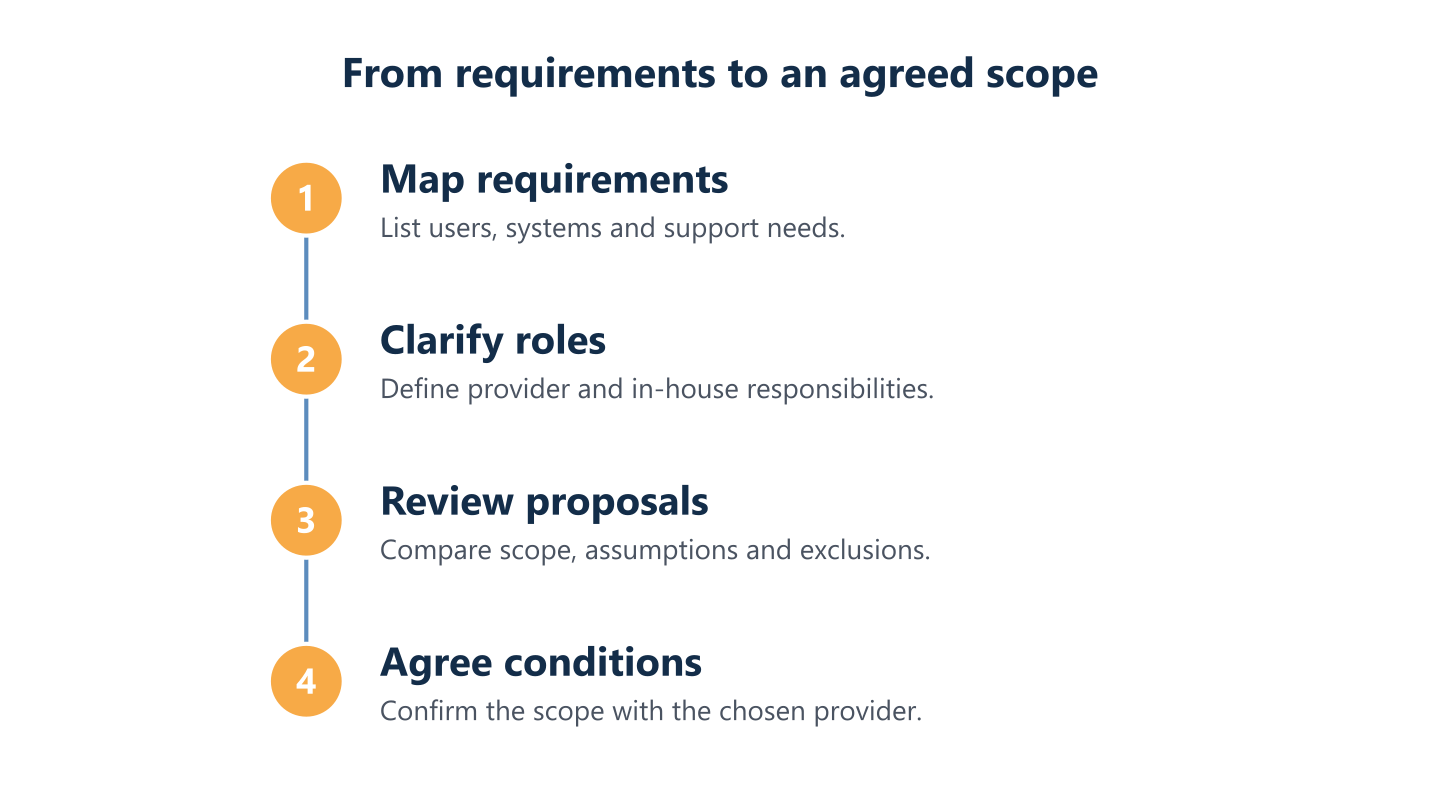
Read the steps as text
Map requirements, clarify roles, review proposals, agree conditions
How to choose a managed service provider
Pricing research only matters if it leads to choosing a provider who understands how your organisation actually works. Before comparing figures, assess whether a provider asks about your current setup in enough detail to price accurately, explains scope in plain terms, and is clear about where their responsibilities end and yours begin. A provider who can work alongside your existing team, rather than only in a fully outsourced model, gives you more flexibility if your needs change over time. BlueNova IT typically works with small and midsize companies across Europe, including organisations with distributed or multi-site teams and no full in-house IT function. Support is available in English and Spanish, Monday to Friday, 09:00–18:00 CET, and the service scope is agreed directly with each organisation rather than fixed in advance. On-site or installation work is subject to confirmation for each project, reflecting the fact that physical access and logistics vary considerably between clients and locations.Match provider responsibilities to your team
Look for a clear explanation of how the provider would define and review your requirements, rather than a generic list of included services. A provider who asks detailed questions about your current pain points, past incidents and internal skills gaps is more likely to propose a scope that genuinely fits. If you already have IT staff, ask how the provider would define the split of responsibilities and how that split would be reviewed over time, since needs on both sides tend to shift as the business grows or internal capacity changes.Assess communication and support arrangements
Check that the proposed responsibilities fit your in-house capabilities and any co-managed working arrangements you want to keep. If your internal team wants to retain ownership of certain systems or vendor relationships, confirm this is reflected in the proposal rather than assumed to transfer by default. Ask how escalation works when an issue spans both teams, and how the provider plans to stay aligned with your internal priorities rather than operating in isolation. Clear answers here are often a better indicator of fit than the pricing model itself.Prepare information before requesting a quote
Ask who will coordinate support and how communication will work, without assuming a particular response time or service level, since these details are agreed per contract rather than offered as a blanket guarantee. Before requesting a quote, prepare a summary of your current environment: user and device counts, key systems, known problem areas and any upcoming projects. Sharing this upfront, rather than waiting for a provider to extract it through back-and-forth emails, usually produces a faster and more accurate proposal, and it signals to the provider that you have a genuine view of your own requirements.Ask practical questions before choosing
Confirm language and support-hour arrangements, as well as whether any on-site or installation work is available for the project, before signing anything. If your team is distributed across several countries, check whether the provider can support users in the languages your staff actually use day to day. Ask directly how scope changes are handled once a contract is running, what happens if your user count grows significantly, and how the provider documents agreed responsibilities, so there is a clear reference point if questions arise later in the relationship.A useful proposal should leave you able to explain, in your own words, what is covered, who is responsible for what, and what assumptions the figure is based on. If any part of that remains unclear after reading a proposal, it is worth asking the provider to clarify before comparing it against alternatives. Pricing models and calculators can help you prepare for that conversation, but the decision ultimately depends on matching scope, responsibilities and working arrangements to your organisation. Clarifying your requirements first makes it easier to judge which approach, and which provider, genuinely fits your situation.Frequently asked questions
What do managed IT services include?
The scope varies by provider and organisation. It may be defined around day-to-day support, maintenance and agreed responsibilities; check the proposal for what is included, excluded and subject to confirmation.
How much do MSPs charge?
There is no single price that applies to every organisation. MSPs may use per-user, per-device, fixed-scope or time-and-materials models, and the cost depends on the agreed scope and conditions.
How much does a managed SOC cost?
There is no universal cost; it depends on the service definition, systems covered and responsibilities agreed with the provider. BlueNova IT does not present managed SOC services as an offering, so contact a relevant provider to discuss its scope and pricing.
How much does an MSSP cost?
Pricing depends on what the organisation is seeking, the environment involved and the responsibilities set out in the proposal. BlueNova IT does not present MSSP services as an offering; ask a relevant provider to explain its scope, assumptions and pricing model.
What should I check in a managed IT services quote?
Check the service scope, pricing basis, responsibilities, assumptions and exclusions. Ask how changes or work outside the agreed scope are handled, and confirm whether any on-site or installation work is available for the project.
How can I compare proposals from different MSPs?
Give each provider the same information about your users, systems, support needs and preferred responsibilities. Then compare what each proposal covers and excludes, rather than comparing the pricing model alone.
What information should I prepare before requesting a quote?
Prepare an overview of your users, devices, systems, existing IT arrangements and support needs. Note which responsibilities you want to retain or share, and identify any on-site or installation requirements for discussion.